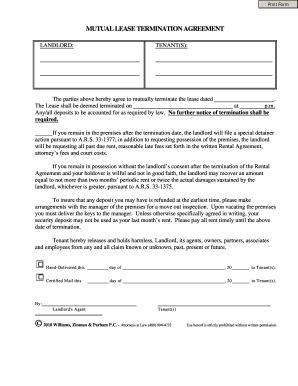
Get Mutual Lease Termination Agreement
How it works
-

Open form follow the instructions
-

Easily sign the form with your finger
-

Send filled & signed form or save
How to fill out the MUTUAL LEASE TERMINATION AGREEMENT online
The mutual lease termination agreement is an important document that outlines the terms agreed upon by both the landlord and tenant regarding the termination of a lease. This guide will provide you with clear, step-by-step instructions on how to fill out this form effectively online.
Follow the steps to complete the mutual lease termination agreement.
- Press the ‘Get Form’ button to acquire the mutual lease termination agreement and open it in your preferred editor.
- Begin by entering the names of the landlord and tenant(s) in the designated fields at the top of the form.
- Next, indicate the date of the original lease agreement in the appropriate section. This information helps clarify which lease is being terminated.
- Specify the termination date by filling in the date on which the lease will be considered terminated. Also, provide the time of day when this termination will take effect, expressed in p.m.
- Review the section regarding deposits. Ensure you understand how any deposits will be handled per the legal requirements outlined.
- Understand the implications of remaining on the premises after the termination date, as detailed in the form. This section emphasizes the consequences of not vacating.
- Complete the section where both parties acknowledge the mutual agreement to terminate the lease by signing and dating the form as specified.
- If necessary, make arrangements for a move-out inspection with the property manager, as described in the document.
- Finally, ensure that the completed agreement is saved properly. Consider options to download, print, or share the finalized document.
Complete your mutual lease termination agreement online today for a smooth transition.
1:38 3:41 How to Insert a Page Break in Excel - YouTube YouTube Start of suggested clip End of suggested clip Page break select a column or row respectively immediately after where you want the page break toMorePage break select a column or row respectively immediately after where you want the page break to appear. Finally click on the insert. Page break option in the break section of the page layout tab.