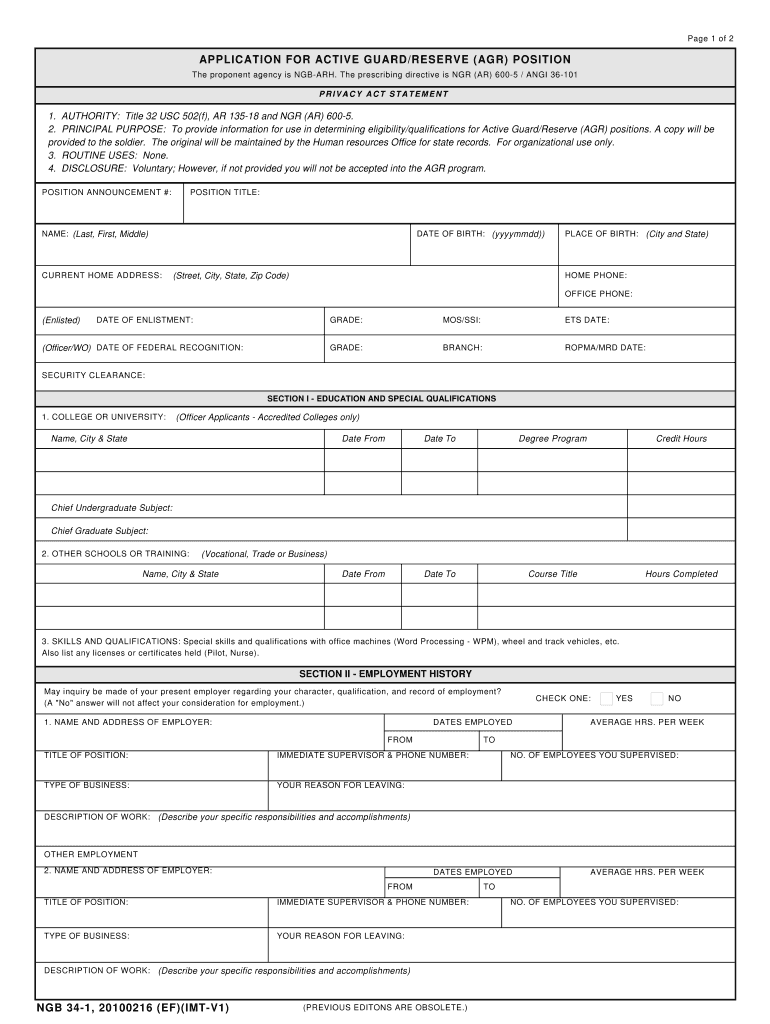
Page 1 of 2 APPLICATION FOR ACTIVE GUARD/RESERVE (AGR) POSITION The proponent agency is NGB-ARH. The prescribing directive is NGR (AR) 600-5 / ANGI 36-101 PRIVACY ACT STATEMENT 1. AUTHORITY: Title.
Loading

Open form follow the instructions

Easily sign the form with your finger

Send filled & signed form or save
How to fill out the Ngb 34 1 online
The Ngb 34 1 form is crucial for applicants seeking an Active Guard/Reserve (AGR) position. Completing this form accurately ensures that your application is considered effectively. This guide will provide you with clear steps for filling out the Ngb 34 1 online.
Follow the steps to fill out the Ngb 34 1 form online.
- Click the ‘Get Form’ button to access the Ngb 34 1 form. This will open the document in a user-friendly editor for your completion.
- Begin filling out the top of the form by entering the position announcement number and position title clearly. Ensure that your information matches any relevant records.
- Provide your personal details, including your name (last, first, middle), current home address, date of birth, place of birth, home phone, and office phone. Use the format indicated and double-check for accuracy.
- Fill in your military details, such as your date of enlistment, grade, MOS/SSI, and ETS date. If applicable, include your date of federal recognition and branch of service.
- In Section I, provide your education and special qualifications. List each accredited college or university attended, including dates and degrees earned. Include relevant vocational training and special skills.
- Move to Section II and detail your employment history. For each employer, include the name, address, employment dates, title, and description of work performed. Indicate if inquiries can be made about your character and qualifications.
- In Section III, document your military history, including all relevant service details and training completed. Ensure to detail your military qualifications and any on-the-job training related to your position.
- Complete Section IV, the personal background questionnaire. Answer each question accurately and attach any necessary explanations on a separate sheet if you answer 'yes' to specific questions.
- In Section V, review and verify the certifications and authority for release of information. By signing, you confirm all information provided is true and complete.
- Once you have filled out the form, review all entries for completeness and accuracy. You can then save your changes, download, print, or share the form as needed.
Complete your Ngb 34 1 form online today for a smooth application process.
Experience a faster way to fill out and sign forms on the web. Access the most extensive library of templates available.
Related content
NGB Form 34-1, 20131111. Page 1 of 3. (PREVIOUS EDITONS ARE OBSOLETE.) APPLICATION FOR...
NGB 34-1, 20101105 (EF)(IMT-V1). Page 1 of 2. (PREVIOUS EDITONS ARE OBSOLETE.) APPLICATION...
National Guard using NGB Form 34-1, Application. for Active Guard/Reserve (AGR) Position...
Get answers to your most pressing questions about US Legal Forms API.
What is a NGB Form 55a?
NGB 55A Form Certificate of Honorable Discharge from the Federally Recognized Army National Guard (must get hard copy only; see http://www.NGB pdc.NGB .army.mil/ Forms.htm)
How do I get an NGB 22?
To obtain a copy of your NGB Form 22/22A, you have to contact the National Guard Adjutant General's Office for the particular state in which you performed National Guard service. For contact information, visit the National Guard website.
How do I fill out my NGB 34 1?
Number of position announcement and position title; Applicant's personal information; Information on education and special qualifications; Employment history; Military history.
How do I fill out AGR application?
Use your CAC, or AKO username and password. Select the Tools icon at the top of the page. Select AGR Application and download the application. Fill out the application in digital format and print once complete.
Use professional pre-built templates to fill in and sign documents online faster. Get access to thousands of forms.
If you believe that this page should be taken down, please follow our DMCA take down process here.