Loading
Get Michigan 3877 And 3878
How it works
-

Open form follow the instructions
-

Easily sign the form with your finger
-

Send filled & signed form or save
How to fill out the Michigan 3877 And 3878 online
Completing the Michigan 3877 and 3878 forms online can streamline the preadmission screening and annual resident review processes for individuals requiring mental health services. This guide will provide clear, step-by-step instructions to assist users in accurately filling out these essential forms.
Follow the steps to successfully complete the forms.
- Click ‘Get Form’ button to access the Michigan 3877 and 3878 forms and open them in your preferred editor.
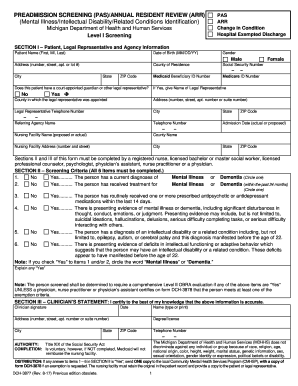
- Section I requires you to enter patient and legal representative information. Fill out the patient's name, date of birth, gender, address, county of residence, and social security number. Ensure you include Medicaid and Medicare ID numbers where applicable.
- Indicate whether the patient has a court-appointed guardian or other legal representative. If 'Yes' is selected, provide the name and contact information of the legal representative.
- Complete the referring agency information, including the agency name and telephone number, admission date, and the name and address of the nursing facility.
- In Section II, mark ‘Yes’ or ‘No’ for each screening criterion regarding mental illness or dementia. Provide details if 'Yes' is selected for any items.
- Ensure that a licensed clinician completes Section III by certifying the accuracy of the information provided. This includes signing and dating the section.
- Once all sections are complete, review the form for accuracy. Users can then save any changes, download, print, or share the completed form as necessary.
Start filling out the Michigan 3877 and 3878 forms online today to ensure efficient processing of your preadmission screening and annual resident review.
Get form
Experience a faster way to fill out and sign forms on the web. Access the most extensive library of templates available.
Get This Form Now!
Use professional pre-built templates to fill in and sign documents online faster. Get access to thousands of forms.