Loading
Get Srmvcas
How it works
-

Open form follow the instructions
-

Easily sign the form with your finger
-

Send filled & signed form or save
How to fill out the Srmvcas online
Filling out the Srmvcas can seem daunting, but this guide provides a step-by-step approach to help you navigate the process with ease. By following these instructions, you can ensure that all necessary information is accurately completed.
Follow the steps to successfully complete the form.
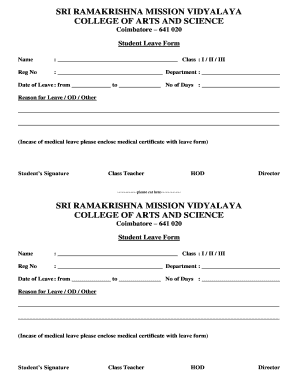
- Click 'Get Form' button to obtain the form and open it in the editor.
- Begin by entering your name in the designated field. Make sure to provide your full name as it appears on your official documents.
- Indicate your class by selecting either I, II, or III. This information helps identify your current academic level.
- Fill in your registration number in the provided field. Ensure this number is accurate, as it is used to track your academic record.
- Specify your department in the relevant section. This identifies your area of study and assists in processing your leave request.
- Enter the date range for your leave in the 'Date of Leave' section. You should provide both the start date and the end date.
- Indicate the total number of days for your leave in the section labeled 'No of Days.' Calculate this based on the dates you have specified.
- Provide a detailed reason for your leave in the 'Reason for Leave / OD / Other' section. This information is crucial for approval.
- If you are applying for medical leave, ensure that you enclose a medical certificate with your completed form, as required.
- Sign the form in the 'Student’s Signature' area to confirm that you acknowledge the request.
- To complete the submission, you may need to obtain signatures from your class teacher, head of department (HOD), and director if required.
- Finally, once all fields are completed and signatures obtained, save your changes, download, print, or share the form as needed.
Start filling out your Srmvcas online today for a smooth and efficient process.
Before me, a Notary Public in and for said County and State, hereby certify that ______________________________, personally known to me to be the affiant in the foregoing affidavit, personally appeared before me this day and having been by me duly sworn deposes and says that the facts set forth in the above affidavit ...