Loading
Get Tessa Residential
How it works
-

Open form follow the instructions
-

Easily sign the form with your finger
-

Send filled & signed form or save
How to fill out the Tessa Residential online
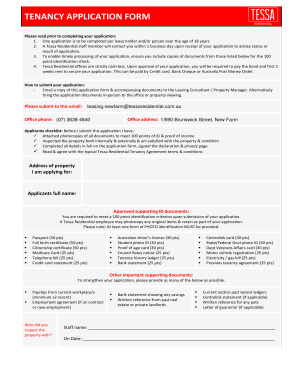
This guide provides clear, step-by-step instructions for completing the Tessa Residential tenancy application online. Each section is detailed to assist users of all backgrounds in submitting their applications accurately and efficiently.
Follow the steps to successfully complete the Tessa Residential form.
- Press the ‘Get Form’ button to access the form and open it in your preferred editor.
- Begin by entering the address of the property you are applying for. Make sure it matches the property details provided in the advertisement.
- Fill out your full name in the designated field. Ensure you use your legal name as it appears on your identification documents.
- Complete the section for approved supporting ID documents. Select from the listed options and ensure the total meets the 100 point identification requirement.
- Provide your date of birth, driver's license number (if applicable), and other contact information, including your mobile phone and email address.
- Indicate your residential status (e.g., Australian citizen, permanent resident, visa holder). Include your current address along with the duration of your stay at this address.
- Detail your current living situation, including your share of rent or board, and the agency or landlord’s contact information.
- Complete the employment information section. Include your current employer, position, employment status, and net weekly income. Attach at least two recent payslips as supporting documentation.
- If self-employed, provide your business name and relevant financial details, including your ABN or ACN.
- Declare any Centrelink payments and include supporting documentation to verify your income.
- In the occupants' details section, list the total number of individuals who will reside at the property, breaking them down by adults and children.
- Fill out the emergency contact information including their name, phone number, and relationship to you.
- Review and sign the declaration section affirming that the information provided is true and complete. Agree to the terms as set forth in the privacy statement.
- Once you have completed the application, save the form and any attached documents. You may then download, print, or share the application as needed.
Complete your Tessa Residential application online today for a swift and efficient tenancy process.
To start a numbered list, type 1, a period (.), a space, and some text. Word will automatically start a numbered list for you. Type* and a space before your text, and Word will make a bulleted list. To complete your list, press Enter until the bullets or numbering switch off.
Industry-leading security and compliance
US Legal Forms protects your data by complying with industry-specific security standards.
-
In businnes since 199725+ years providing professional legal documents.
-
Accredited businessGuarantees that a business meets BBB accreditation standards in the US and Canada.
-
Secured by BraintreeValidated Level 1 PCI DSS compliant payment gateway that accepts most major credit and debit card brands from across the globe.