Loading
Form preview
  • US Legal Forms
  • Other Templates
  • More Forms
  • More Multi-State Forms
  • Tanglewood Training Dog Training/in-house Boarding ...

Get Tanglewood Training Dog Training/in-house Boarding ...

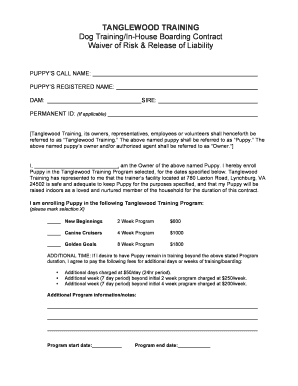
TANGLEWOOD TRAINING Dog Training/InHouse Boarding Contract Waiver of Risk & Release of Liability PUPPYS CALL NAME: PUPPYS REGISTERED NAME: DAM: SIRE: PERMANENT ID: (If applicable) Tanglewood Training,.

How it works

  1. Open form

    Open form follow the instructions

  2. Easily sign form

    Easily sign the form with your finger

  3. Share form

    Send filled & signed form or save

How to fill out the TANGLEWOOD TRAINING Dog Training/In-House Boarding form online

Filling out the TANGLEWOOD TRAINING Dog Training/In-House Boarding form online is a straightforward process that helps ensure the smooth enrollment of your puppy in the training program of your choice. This guide will provide clear, step-by-step instructions for each section of the form, making the process seamless and efficient.

Follow the steps to complete your form accurately and efficiently.

  1. To begin, select the ‘Get Form’ button to obtain the document and access it in an online format.
  2. In the designated section, input your puppy’s call name and registered name. This information helps TANGLEWOOD TRAINING identify your puppy.
  3. Include the names of the dam and sire of your puppy, if applicable. This pedigree information may aid in training identification.
  4. If your puppy has a permanent ID, please enter that in the respective field. This might include microchip numbers or other identification.
  5. Identify yourself as the owner by providing your name in the correct field. This ensures that TANGLEWOOD TRAINING recognizes you as the authorized agent for your puppy.
  6. Select the TANGLEWOOD TRAINING program you wish to enroll your puppy in by marking your choice clearly with an ‘X’. Options include the New Beginnings 2-week, Canine Cruisers 4-week, or Golden Goals 8-week programs.
  7. Fill out the additional time section if you wish for your puppy to remain in training beyond the selected program duration. Provide the requested information about additional days or weeks of training and the associated costs.
  8. Enter the program start and end dates to give TANGLEWOOD TRAINING a clear timeline for your puppy’s training.
  9. Complete the veterinary release section, which allows TANGLEWOOD TRAINING to seek emergency veterinary care if needed. This is crucial for your puppy's well-being.
  10. Ensure you fill in the payment agreement details accurately, confirming your acknowledgment of the fees required for the training program and any additional costs involved.
  11. Review the performance and abandonment clause to understand the implications of your agreement. Make sure you are comfortable with these terms before proceeding.
  12. Sign and date the document in the signature section, confirming that you have read and accepted the terms and conditions outlined.
  13. Finally, provide your emergency contact details in the specified fields to ensure TANGLEWOOD TRAINING can reach a designated person if necessary.
  14. Once you have filled out all sections, you can save your changes, download, print, or share the form as required.

Begin filling out your TANGLEWOOD TRAINING Dog Training/In-House Boarding form online today for a smooth enrollment process.

Get form

Experience a faster way to fill out and sign forms on the web. Access the most extensive library of templates available.
Get form

Related content

Tanglewood and Will Creek Fire Complex Summaries
The NIST hardware was pre-staged in Texas and several field training exercises were...
Learn more
Critic's Notebook: Remembering a Tanglewood Music...
Nov 5, 2019 — LENOX — Richard Ortner left Tanglewood under duress, but in a ... and...
Learn more

Related links form

TX C-107E 2006 GA Form C100 2022 AR DMS-2609 2018 Appliance Warehouse Key Release Form 2013

Questions & Answers

Get answers to your most pressing questions about US Legal Forms API.

Contact support

You can easily fit content onto one page by following these steps: Select Page Layout. ... Choose the Page tab from the Page Setup dialog box. Choose “Fit to” under Scaling. Choose one page wide by one tall in the “Fit to” boxes to fit your content on one page. Select OK at the bottom of the Page Setup dialog box.

Click on the 'Edit' tab in the top menu. Select the 'Rearrange Columns' option from the dropdown menu. A new window will appear, displaying the current column order of your PDF document. To rearrange the columns, simply drag and drop them to the desired position.

Resize columns and rows Select cells in the columns and rows you want to resize. Do one of the following: In the Table panel, specify Column Width and Row Height settings. Choose Table > Cell Options > Rows And Columns, specify Row Height and Column Width options, and then click OK.

To select a column of text (vertically), hold down Ctrl+Alt (Windows) or Option+Command (Mac OS) as you drag the length of the document. Note: You can also use the column select tool. To select all the text on the page, choose Edit > Select All.

To select multiple columns of text (horizontally), hold down Ctrl (Windows) or Option (Mac OS) as you drag across the width of the document. To select a column of text (vertically), hold down Ctrl+Alt (Windows) or Option+Command (Mac OS) as you drag the length of the document.

Position the pointer over the edge of a column or row so that a double-arrow icon ( or ) appears, and then drag left or right to increase or decrease the column width, or drag up or down to increase or decrease row height.

How to Edit a Fillable PDF (that you made) Open your fillable PDF document in PDF Pro. Press the Forms tab. Press Modify Form Layout button to highlight all form fields for editing, or click any button in the Form Types section to add a new form field. Perform your edits to your PDF.

Resize the entire table. Using the Type tool , position the pointer over the lower-right corner of the table so that the pointer becomes an arrow shape , and then drag to increase or decrease the table size. Hold down Shift to maintain the table's height and width proportions.

Follow these simple steps to rearrange columns in your PDF: Open the PDF document you want to rearrange columns in using . Click on the 'Edit' tab in the top menu. Select the 'Rearrange Columns' option from the dropdown menu. A new window will appear, displaying the current column order of your PDF document.

Get This Form Now!

Use professional pre-built templates to fill in and sign documents online faster. Get access to thousands of forms.
Get form
If you believe that this page should be taken down, please follow our DMCA take down processhere.
Get TANGLEWOOD TRAINING Dog Training/In-House Boarding ...
Get form
  • Adoption
  • Bankruptcy
  • Contractors
  • Divorce
  • Home Sales
  • Employment
  • Identity Theft
  • Incorporation
  • Landlord Tenant
  • Living Trust
  • Name Change
  • Personal Planning
  • Small Business
  • Wills & Estates
  • Packages A-Z
  • Affidavits
  • Bankruptcy
  • Bill of Sale
  • Corporate - LLC
  • Divorce
  • Employment
  • Identity Theft
  • Internet Technology
  • Landlord Tenant
  • Living Wills
  • Name Change
  • Power of Attorney
  • Real Estate
  • Small Estates
  • Wills
  • All Forms
  • Forms A-Z
  • Other Templates
  • Legal Hub
  • About Us
  • Help Portal
  • Legal Resources
  • Blog
  • Affiliates
  • Contact Us
  • Delete My Account
  • Site Map
  • Industries
  • Forms in Spanish
  • Localized Forms
  • State-specific Forms
  • Forms Kit
  • Real Estate Handbook
  • All Guides
  • Notarize
  • Incorporation services
  • For Consumers
  • For Small Business
  • For Attorneys
  • USLegal
  • FormsPass
  • pdfFiller
  • signNow
  • altaFlow
  • DocHub
  • Instapage
Form Packages
  • Adoption
  • Bankruptcy
  • Contractors
  • Divorce
  • Home Sales
  • Employment
  • Identity Theft
  • Incorporation
  • Landlord Tenant
  • Living Trust
  • Name Change
  • Personal Planning
  • Small Business
  • Wills & Estates
  • Packages A-Z
Form Categories
  • Affidavits
  • Bankruptcy
  • Bill of Sale
  • Corporate - LLC
  • Divorce
  • Employment
  • Identity Theft
  • Internet Technology
  • Landlord Tenant
  • Living Wills
  • Name Change
  • Power of Attorney
  • Real Estate
  • Small Estates
  • Wills
  • All Forms
  • Forms A-Z
  • Other Templates
Customer Service
  • Legal Hub
  • About Us
  • Help Portal
  • Legal Resources
  • Blog
  • Affiliates
  • Contact Us
  • Delete My Account
  • Site Map
  • Industries
  • Forms in Spanish
  • Localized Forms
  • State-specific Forms
  • Forms Kit
Legal Guides
  • Real Estate Handbook
  • All Guides
Prepared for you
  • Notarize
  • Incorporation services
Our Customers
  • For Consumers
  • For Small Business
  • For Attorneys
Our Sites
  • USLegal
  • FormsPass
  • pdfFiller
  • signNow
  • altaFlow
  • DocHub
  • Instapage
Social Media
Call us now toll free:
+1 833 426 79 33
As seen in:
© Copyright 1999-2026 airSlate Legal Forms, Inc. 17 Station Street, Ste. 203, Brookline, MA 02445
  • Your Privacy Choices
  • Terms of Service
  • Privacy Notice
  • Content Takedown Policy
  • Bug Bounty Program