Loading
Get Idirektori
How it works
-

Open form follow the instructions
-

Easily sign the form with your finger
-

Send filled & signed form or save
How to fill out the Idirektori online
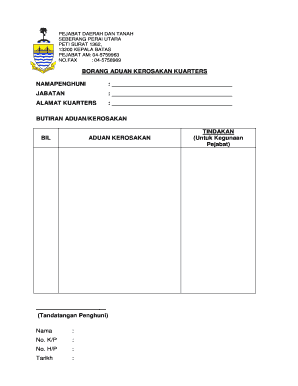
Filling out the Idirektori can seem daunting, but with clear instructions, it becomes a manageable task. This guide will walk you through each section of the form step by step, ensuring you can complete it efficiently.
Follow the steps to complete the Idirektori form online effectively.
- Click ‘Get Form’ button to obtain the form and open it in the editor.
- In the first section, enter your name in the 'Namapenghuni' field. Ensure that the spelling is correct, as it will be used for any relevant correspondence.
- Next, fill in the 'Jabatan' field by providing the name of the department related to the quarters in question. This information is essential for proper classification.
- In the 'Alamat Kuarters' section, input the complete address of the quarters. Make sure to include any relevant details such as unit numbers or street names.
- Proceed to the 'Butiran Aduan/Kerosakan' section. Here, list the details of the complaint or damage you are reporting. Include specific descriptions to help expedite the process of addressing your issue.
- Under 'Bil Aduan Kerisakan', number each complaint if there are multiple issues. This helps in organizing the complaints for review.
- In the designated area for your signature, provide your name, identification number ('No. K/P'), mobile number ('No. H/P'), and the date on which you are submitting the form.
- Review the completed form for accuracy and completeness before submission.
- Finally, save your changes, and you will have the option to download, print, or share the form as needed.
Take the first step and fill out your documents online today!
Industry-leading security and compliance
US Legal Forms protects your data by complying with industry-specific security standards.
-
In businnes since 199725+ years providing professional legal documents.
-
Accredited businessGuarantees that a business meets BBB accreditation standards in the US and Canada.
-
Secured by BraintreeValidated Level 1 PCI DSS compliant payment gateway that accepts most major credit and debit card brands from across the globe.