
Open form follow the instructions

Easily sign the form with your finger

Send filled & signed form or save
How to fill out the Acirt online
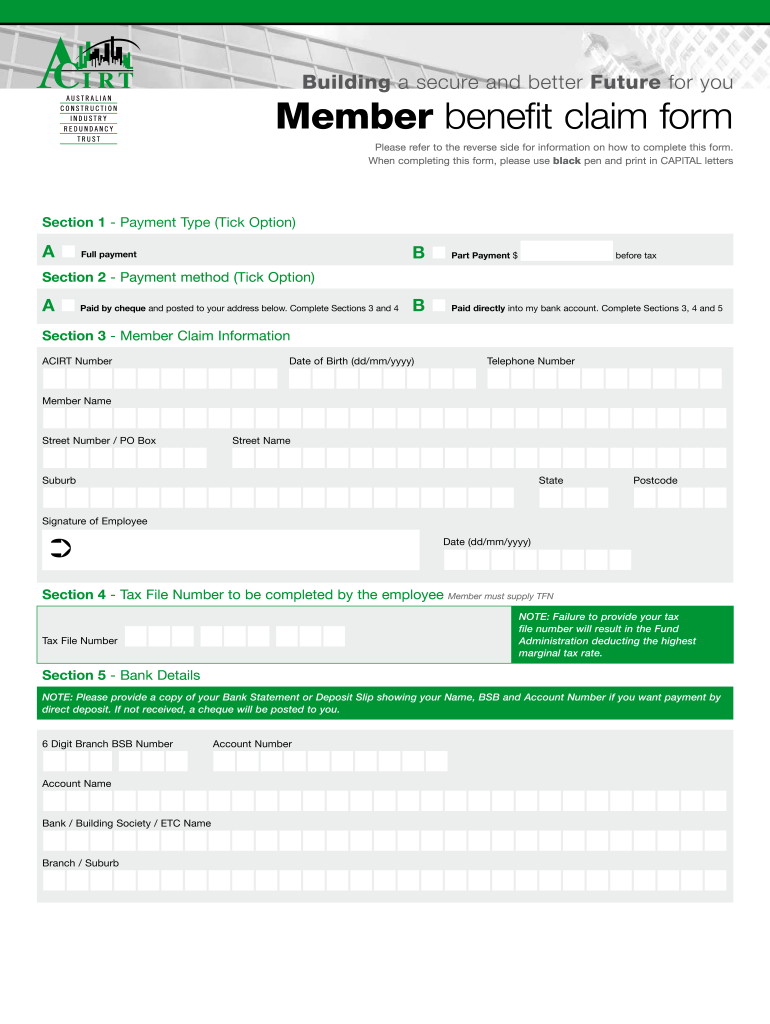
Completing the Acirt form is essential for claiming your member benefits efficiently. This guide provides clear, step-by-step instructions to help you navigate the online process effectively.
Follow the steps to successfully complete your Acirt form.
- Click the ‘Get Form’ button to access the Acirt document and open it in your editing tool.
- In Section 1, select your payment type by ticking either the full payment option or the part payment option, indicating the amount before tax if applicable.
- In Section 2, indicate your payment method by ticking either the option for payment by cheque, which requires completing Sections 3 and 4, or for direct payment into your bank account, which requires completing Sections 3, 4, and 5.
- In Section 3, enter your ACIRT number, date of birth in the specified format (dd/mm/yyyy), and your contact information including telephone number and member name. Also, provide your street address, suburb, state, and postcode.
- In Section 4, enter your Tax File Number. Ensure you provide this information, as failure to do so may result in higher tax deductions.
- In Section 5, if choosing to be paid directly, provide your 6-digit branch BSB number, account number, account name, and the name of the bank or building society. Attach a copy of a bank statement or deposit slip that verifies your details.
- Review the information provided in all sections for accuracy, and then proceed to save your changes, download a copy of the completed form, or share it as needed.
Complete your Acirt document online today for a smoother claim process.
Experience a faster way to fill out and sign forms on the web. Access the most extensive library of templates available.
Related content
by J Grainger · 2006 · Cited by 226 — "acirt" as primes for the target "apricot")...
... ho Eininciil hnmenlaid Eininciilaid 101111 101111aId aId AlLrt Acirt AlLrtJltd...
Get answers to your most pressing questions about US Legal Forms API.
How much tax do you pay on Acirt?
If your ETP plus your other taxable income is under the cap of $180,000 (or $195,000 if the payment is from one employer) and you are at or over preservation age, you will be taxed at 15% (plus the Medicare levy). If you are under the preservation age, you will be taxed at 30% (plus the Medicare levy).
What is Acirt?
ACIRT stands for the Australian Construction Industry Redundancy Trust. It was established in 1994 to create a safety net for workers in the construction industry who lose their jobs. ... Then if a member is made redundant, ACIRT will pay an entitlement to them calculated on a weekly basis, and paid monthly in arrears.
How long do Acirt claims take?
How long does it take to process my claim form? It generally takes 3 working days after all documentation has been received. Please allow for at least another 24 hours for your bank to process the deposit, or if you are receiving a cheque, for standard Australia Post delivery times.
What is a redundancy trust?
Redundancy Funds are funds established for the purpose of funding redundancies and other employee entitlements for employees in an industry including union members. These funds are a managed investment scheme, which are operated by a corporate trustee and governed by a trust deed.
Use professional pre-built templates to fill in and sign documents online faster. Get access to thousands of forms.
If you believe that this page should be taken down, please follow our DMCA take down process here.