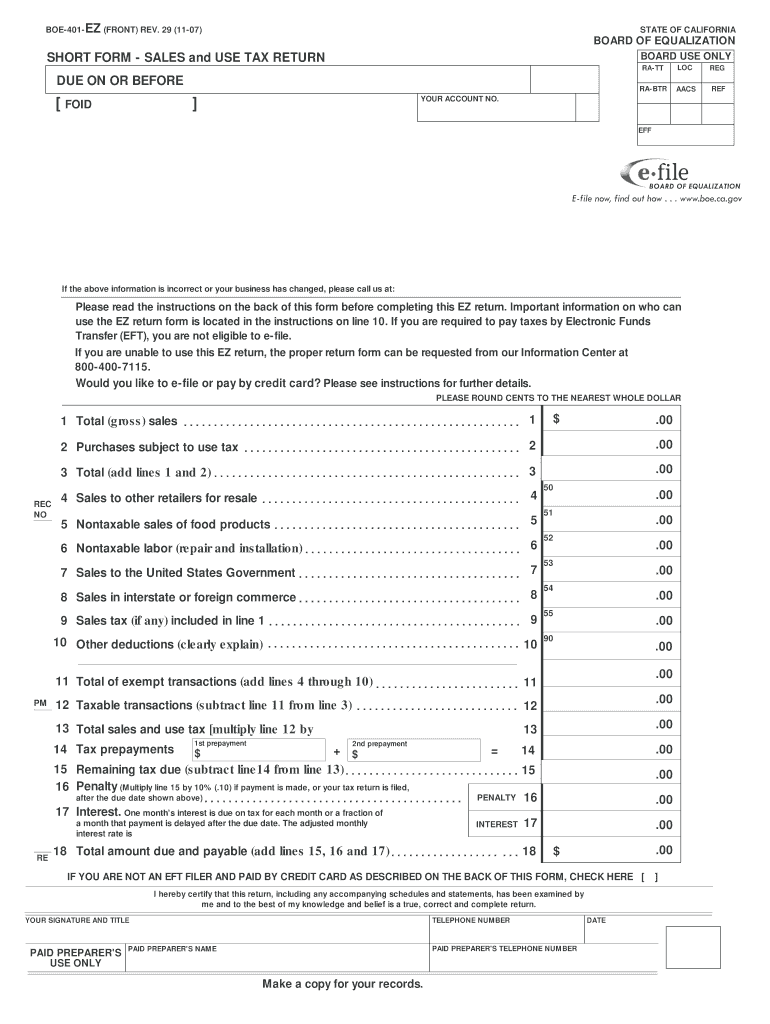
R ACCOUNT NO. EFF If the above information is incorrect or your business has changed, please call us at: Please read the instructions on the back of this form before completing this EZ return. Important information on who can use the EZ return form is located in the instructions on line 10. If you are required to pay taxes by Electronic Funds Transfer (EFT), you are not eligible to e-file. If you are unable to use this EZ return, the proper return form can be requested from our Information.
Loading

Open form follow the instructions

Easily sign the form with your finger

Send filled & signed form or save
How to fill out the Boe 401 Ez online
This guide provides a clear and supportive walkthrough for users filling out the Boe 401 Ez form online. Whether you are familiar with tax forms or new to this process, this comprehensive guide will help you accurately complete your sales and use tax return.
Follow the steps to complete the Boe 401 Ez form online.
- Press the ‘Get Form’ button to access the Boe 401 Ez form and open it in your browser.
- Begin by verifying that all pre-filled information in the form is correct. If there are discrepancies in your business information, contact the Board for assistance.
- Move to line 1 and enter your total (gross) sales, rounding cents to the nearest whole dollar as specified.
- Proceed to line 2 to report purchases that are subject to use tax. List the total purchase price of any items you bought without paying California sales tax.
- On line 3, sum the amounts from lines 1 and 2, then input the total.
- For line 4, input any sales made to other retailers for resale, ensuring you have valid resale certificates.
- Complete line 5 by entering nontaxable sales of food products. Be careful to exclude alcoholic or carbonated beverages and other ineligible food sales.
- Line 6 is for reporting nontaxable labor charges, such as installation works or repairs.
- On line 11, total the exempt transactions by adding lines 4 through 10 and enter the result.
- Calculate your taxable transactions for line 12 by subtracting the total from line 11 from the total on line 3.
- Multiply the taxable amount on line 12 by the applicable tax rate and enter this figure on line 13.
- If you have made any tax prepayments, report these amounts on line 14.
- Subtract line 14 from line 13 to determine any remaining tax due on line 15.
- If applicable, calculate any penalties for late filing on line 16, which is 10% of the amount due.
- Calculate interest for late payments to enter on line 17, based on the number of months payment is delayed.
- Finally, total lines 15, 16, and 17 to get the total amount due on line 18, which is your final calculated amount.
- Review all entered information for accuracy before signing. After confirming the details, print the form, and mail it along with your payment, ensuring to keep a copy for your records.
Complete your Boe 401 Ez form online today to ensure timely submission and compliance.
Experience a faster way to fill out and sign forms on the web. Access the most extensive library of templates available.
Related content
Instructions for Completing CDTFA-401-A, State, Local, and District Sales and Use Tax...
the BOE/CDTFA with respect to rentals of the property. If the credit is less ... A2...
IoA-S1 Ez,! III. IA II P HI ... 0~BHI'11EYl r ::1'1. 1900HPl. rB1 3 ~1. [B1 0~900R u. 1...
Get answers to your most pressing questions about US Legal Forms API.
Is it better to file long form or short form?
The difference between these federal income tax forms is the relative simplicity of short forms 1040EZ and 1040A — compared to the longer, more complex Form 1040. Using the shorter tax forms can simplify your tax preparation. Each of these tax forms has the same set of purposes, including: Reporting your income.
How do I download a 1040EZ form?
Get the current filing year's forms, instructions, and publications for free from the Internal Revenue Service (IRS). Download them from IRS.gov. Order by phone at 1-800-TAX-FORM (1-800-829-3676)
Does California refund sales tax to foreigners?
The US Government does not refund Sales Tax to Visitors US Customs and Border Protection has clarified on the CBP website that says, “The United States Government does not refund sales tax to foreign visitors. Sales tax charged in the United States is paid to individual states, not the Federal government …”.
How do I fill out a 1040 married filing jointly?
0:00 2:28 How To Fill Out 2021 Form 1040 Tax Return for Married Filing Jointly in 2 ... YouTube Start of suggested clip End of suggested clip On line 1 put your wages. You can find this information in box 1 of the form w-2 that your employerMoreOn line 1 put your wages. You can find this information in box 1 of the form w-2 that your employer sent. You add the two amounts from both your w-2s.
What's the difference between 1040 and 1040A?
All taxpayers can use Form 1040; however, to use Form 1040A you must satisfy a number of requirements, such as having taxable income of $100,000 or less and claiming the standard deduction rather than itemizing.
Is the IRS Form 1040A or 1040EZ?
The simplest IRS form is the Form 1040EZ. The 1040A covers several additional items not addressed by the EZ. And finally, the IRS Form 1040 should be used when itemizing deductions and reporting more complex investments and other income. Here are a few general guidelines on which form to use.
What form do I use for married filing jointly?
Form 1040-EZ: Income Tax Return for Single and Joint Filers With No Dependents.
How do I know which tax form to use?
WASHINGTON -- If you are filing a tax return on paper, you should use the simplest form for which you qualify. The simpler the form, the less chance for an error that may cost you money or delay the processing of your return. The simplest IRS form is the Form 1040EZ.
Use professional pre-built templates to fill in and sign documents online faster. Get access to thousands of forms.
If you believe that this page should be taken down, please follow our DMCA take down process here.