Loading
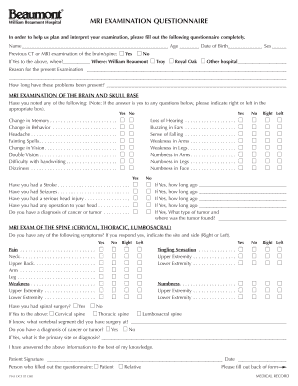
Get William Beaumont Mri
How it works
-

Open form follow the instructions
-

Easily sign the form with your finger
-

Send filled & signed form or save
How to fill out the William Beaumont Mri online
This guide provides a step-by-step approach to filling out the William Beaumont Mri examination questionnaire online. By following these instructions, users can ensure that they submit their information accurately and completely, aiding in the effective planning and interpretation of their examination.
Follow the steps to complete the William Beaumont Mri questionnaire online.
- Press the ‘Get Form’ button to access the William Beaumont Mri examination questionnaire. This will allow you to open and complete the form in your preferred online editor.
- Begin by filling in your name, age, and date of birth in the designated fields. Ensure that these details are accurate, as they are essential for your medical records.
- Indicate whether you have previously undergone a CT or MRI examination of the brain or spine by selecting 'Yes' or 'No'. If 'Yes', provide the date and location of the examination.
- In the section labeled 'Reason for the present examination', clearly describe the symptoms or medical concerns that led you to request this MRI. Be as detailed as possible.
- Next, specify how long you have been experiencing these issues. This information helps the medical team understand the context of your current condition.
- Proceed to the section about MRI examination of the brain and skull base. For each symptom listed, mark 'Yes' or 'No' accordingly. If you answer 'Yes', indicate the side (right or left) in the appropriate boxes.
- Continue with the questions regarding any history of strokes, seizures, serious head injuries, previous surgeries, and cancer diagnoses. Provide additional context where required.
- Move to the MRI examination of the spine section. Here, report any symptoms and indicate the areas affected (cervical, thoracic, lumbosacral) by marking the relevant boxes.
- If applicable, use the provided diagram to mark the areas where you experience pain. This visual representation will assist your healthcare provider in understanding your symptoms.
- At the end of the form, review all entered information for accuracy. Once satisfied, you may save changes, download, or print the completed questionnaire. Make sure to sign and date the form as required.
Take action now and complete your William Beaumont Mri examination questionnaire online for effective medical planning.
For more information, contact the MRI Clinic at 915-742-6466/1630/5057.