Loading
Get Ddd Incident Report
How it works
-

Open form follow the instructions
-

Easily sign the form with your finger
-

Send filled & signed form or save
How to fill out the Ddd Incident Report online
The Ddd Incident Report is a crucial document used to document incidents involving individuals receiving services from the Division of Developmental Disabilities. This guide provides clear, step-by-step instructions for filling out the report online, ensuring that all required information is captured accurately and thoroughly.
Follow the steps to complete the Ddd Incident Report online.
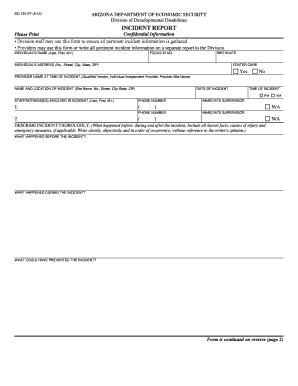
- Press the ‘Get Form’ button to obtain the Ddd Incident Report and open it in your chosen editor.
- Begin filling out the form by entering the individual's name in the designated field, ensuring to include their last name, first name, and middle initial.
- Input the individual's focus ID number in the appropriate section.
- Provide the birthdate of the individual using the specified format.
- Enter the individual's address, including number, street, city, state, and ZIP code.
- Indicate whether the individual is in foster care by selecting ‘Yes’ or ‘No’.
- Specify the name of the provider at the time of the incident, which may include the qualified vendor, individual independent provider, or provider site name.
- Detail the name and location of the incident, including site name, address, and ZIP code where the incident occurred.
- Fill in the date and time of the incident, choosing between AM or PM.
- List the staff members or witnesses involved in the incident, including their last names, first names, middle initials, and phone numbers.
- Identify the immediate supervisor involved by name, or mark ‘N/A’ if not applicable.
- Thoroughly describe the incident in the provided section, covering what happened before, during, and after the incident, along with any known facts and emergency measures taken.
- Continue to the second page of the form for additional information such as the type and location of any medical intervention that occurred.
- Complete the notifications section, detailing who was informed about the incident, such as parents or guardians, support coordinators, and authorities, marking appropriately.
- Fill out the section for corrective actions and comments, explaining what steps are being taken to prevent similar incidents.
- Finally, add the name, signature, and date for both the person completing the form and their supervisor.
- Once finished, review the form for accuracy and completeness before saving changes, downloading, printing, or sharing the form as needed.
Start filling out the Ddd Incident Report online to ensure accurate documentation of incidents.
Get form
Experience a faster way to fill out and sign forms on the web. Access the most extensive library of templates available.
The simple model shown in Figure 1 attempts to illustrate that the causes of any incident can be grouped into five categories - task, material, environment, personnel, and management.
Get This Form Now!
Use professional pre-built templates to fill in and sign documents online faster. Get access to thousands of forms.