Loading
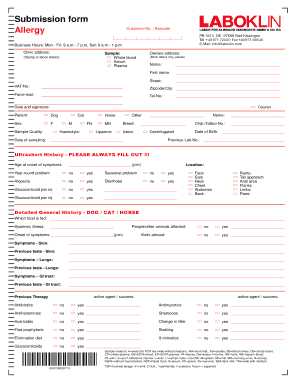
Get Submission Form Allergy - Blaboklinb Finland - Laboklin
How it works
-

Open form follow the instructions
-

Easily sign the form with your finger
-

Send filled & signed form or save
How to fill out the Submission Form Allergy - BLABOKLINb Finland - Laboklin online
Filling out the Submission Form Allergy for Laboklin serves as a crucial step in providing necessary information for allergy testing. This guide will walk you through the process of completing the form accurately and efficiently.
Follow the steps to successfully complete the Submission Form Allergy.
- Click the ‘Get Form’ button to access the Submission Form Allergy. This action will open the form in your preferred document editor.
- Enter your customer number or barcode in the designated section. This helps to identify your records in the Laboklin system.
- Fill in your contact details under ‘Clinic address’ and ‘Owners address’. Ensure these are accurate to facilitate communication.
- Specify the sample type being submitted—options include whole blood, serum, or plasma. Clearly indicate this at the top of the form.
- Provide your name and first name in the respective fields. Use block letters for clarity.
- Complete your address details, including street, VAT number, zipcode, and city. Make sure all fields are filled out accurately.
- Include your fax or email for any follow-up communications, alongside your telephone number.
- Indicate the date and provide your signature at the bottom of the form to confirm the submission.
- Enter the details of the patient, including whether the patient is a dog, cat, or horse. Specify the sex and sample quality of the animal.
- Fill out the date of sampling and any identifiers such as chip or tattoo numbers if applicable.
- Complete the ‘Ultrashort History’ section, where you describe the onset of symptoms and whether they are year-round or seasonal.
- Provide a detailed general history about the animal, including its diet and any systemic illnesses.
- Fill in any symptoms, previous tests, and previous therapies related to skin, lungs, and GI tract as applicable.
- Once all necessary information is entered, review the form to ensure accuracy. You can then save the changes, download, print, or share the completed form as needed.
Start filling out the Submission Form Allergy online today to ensure timely processing of your allergy testing.
There are some companies that have strict no-HTML policies for security and privacy reasons, so in such cases, when either the recipient has elected to turn HTML off for incoming emails, or someone at their company or email host has, those contacts will only receive the plaintext version of your campaign.
Industry-leading security and compliance
US Legal Forms protects your data by complying with industry-specific security standards.
-
In businnes since 199725+ years providing professional legal documents.
-
Accredited businessGuarantees that a business meets BBB accreditation standards in the US and Canada.
-
Secured by BraintreeValidated Level 1 PCI DSS compliant payment gateway that accepts most major credit and debit card brands from across the globe.