Loading
Get Woodlawn Trustees
How it works
-

Open form follow the instructions
-

Easily sign the form with your finger
-

Send filled & signed form or save
How to fill out the Woodlawn Trustees online
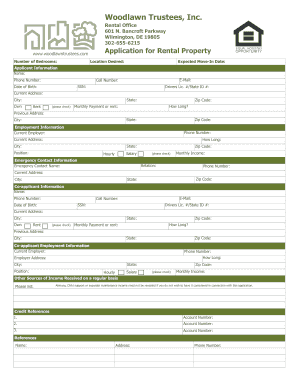
Filling out the Woodlawn Trustees application for rental property can be a straightforward process when approached step-by-step. This guide is designed to help users navigate through each section of the form with clarity and ease.
Follow the steps to successfully complete your rental application.
- Press the ‘Get Form’ button to access the application form and open it in your preferred document editor.
- Begin by entering the location you desire to rent under 'Location Desired'. Specify the number of bedrooms needed in the 'Number of Bedrooms' field.
- Indicate your expected move-in date in the corresponding field.
- Provide your personal information in the 'Applicant Information' section. Fill in your name, phone number, email, cell number, Social Security number, and date of birth.
- Input your driver's license or state ID number, current address, and check whether you own or rent your current residence.
- Include your city, state, and zip code, along with how long you have lived at your current address and your monthly payment or rent.
- List your previous address, including city, state, and zip code.
- In the 'Employment Information' section, include your current employer's name, phone number, address, and how long you have been employed there.
- Specify your job position and whether your salary is hourly or based on another structure.
- Provide your monthly income and complete the emergency contact information, ensuring to include the name, relation, and phone number of your emergency contact.
- If applicable, fill out the co-applicant information similar to the applicant section, including names, contact details, and employment information.
- List any additional sources of income in the specified field, and provide the necessary credit references, including account numbers.
- Fill in any occupants' names, their relationship to you, date of birth, driver's license number, phone number, Social Security number, and email address.
- If needed, complete the guarantor information, including similar details as provided for the applicant.
- Review all filled sections carefully for accuracy. Upon completion, you can choose to save changes, download, print, or share the application as required.
Start your online application process to secure your rental property today.
Rich Przywara - President & CEO - Woodlawn Trustees | LinkedIn.