Loading
Get Dsp Mutual Fund Minor To Major Form
How it works
-

Open form follow the instructions
-

Easily sign the form with your finger
-

Send filled & signed form or save
How to fill out the Dsp Mutual Fund Minor To Major Form online
Updating the status of a minor to a major in a mutual fund can seem daunting, but this guide will provide clear and supportive instructions on how to fill out the Dsp Mutual Fund Minor To Major Form online. By following these steps, you can ensure a smooth process for making this important change.
Follow the steps to complete the form successfully
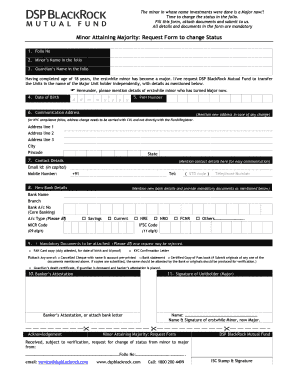
- Click the ‘Get Form’ button to obtain the form and open it in the editor.
- Enter the folio number associated with the minor's investment in the designated field.
- Fill in the minor’s full name as it appears in the folio.
- Input the guardian’s name as mentioned in the folio.
- Provide the date of birth of the minor, ensuring the format is correct (dd/mm/yyyy).
- Enter the PAN number of the minor in the applicable field.
- Fill out the communication address. If there is any change in the address, mention the new details clearly, including address lines, city, pincode, and state.
- Input the contact details, including an email address in capital letters and mobile number with the country code. You also have the option to provide a telephone number.
- Provide the new bank details, including the bank name, branch, account number, account type, MICR code, and IFSC code. Ensure accuracy to avoid processing delays.
- Review the mandatory documents that need to be attached. Ensure the PAN card copy, KYC confirmation letter, and any one of the requested account verification documents are included. Remember, attachments must be duly attested by the bank if copies are submitted.
- If the guardian is deceased, attach the guardian’s death certificate along with the banker’s attestation.
- Complete the banker’s attestation section if required, and ensure the signature of the unitholder (the individual who has now attained majority) is included.
- Finally, review all entered details for accuracy before submitting. Save your changes, download, print, or share the form as needed.
Complete your documents online today for a seamless change of status.
Service Request Form duly filled in and signed by the unitholder. New Bank Account details where the status of Bank Account is changed from Minor to Major; Signature Attestation of the Major by the Manager of a Scheduled Commercial Bank/Bank Certificate/Letter. KYC Acknowledgement Letter of the Major.