Loading
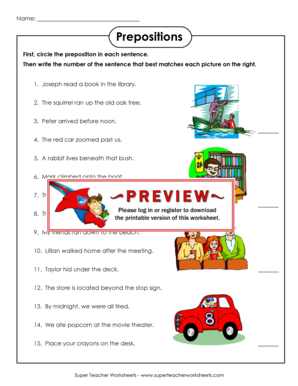
Get Super Teacher Worksheets Prepositions
How it works
-

Open form follow the instructions
-

Easily sign the form with your finger
-

Send filled & signed form or save
How to fill out the Super Teacher Worksheets Prepositions online
This guide provides comprehensive instructions on how to effectively complete the Super Teacher Worksheets Prepositions form online. Each section and field will be clearly outlined to assist users in efficiently navigating the requirements.
Follow the steps to complete the Super Teacher Worksheets Prepositions form.
- Click the ‘Get Form’ button to access the prepositions form and open it in your editor.
- Begin by identifying the first part of the form where you will write your name. This field is typically located at the top of the document and requires your full name for identification purposes.
- Proceed to the main section of the form that contains the sentences. Your task is to read each sentence carefully and circle the preposition used within it. Take your time to ensure accuracy.
- Next, you will find a series of pictures on the right side of the form. Write the number corresponding to the sentence that best matches each picture. This will help reinforce your understanding of how prepositions function in context.
- When you have completed circling the prepositions and matching them with the appropriate sentences, review your answers for any errors. It is essential to double-check your work to ensure completeness.
- Finally, you will have options to save your changes, download the completed form, print it for physical submission, or share it as needed. Choose the option that suits your requirements.
Start filling out your Super Teacher Worksheets Prepositions form online today for a seamless educational experience!
A checkbox cannot be set to indeterminate state by an HTML attribute - it must be set by a JavaScript. This state can be used to force the user to check or uncheck the checkbox.