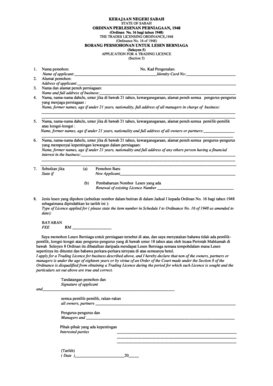
KERAJAAN NEGERI SABAH STATE OF SABAH ORDINAN PERLESENAN PERNIAGAAN, 1948 (Ordinan No. 16 bagi tahun 1948) THE TRADES LICENSING ORDINANCE,1948 (Ordinance No. 16 of 1948) BORANG PERMOHONAN UNTUK LESEN.
Loading
Open form follow the instructions
Easily sign the form with your finger
Send filled & signed form or save
How to fill out the Ordinan Perlesenan Perdagangan 1948 online
This guide provides clear, step-by-step instructions on how to fill out the Ordinan Perlesenan Perdagangan 1948 online. Whether you are a new applicant or renewing an existing licence, you will find the necessary information to complete the form correctly.
Follow the steps to successfully complete your application.
- Click ‘Get Form’ button to access the online form and open it in the suitable editor.
- Fill out the applicant's name, providing your full name as it appears on your identity document.
- Enter your identity card number in the designated field, ensuring it is correct and up to date.
- Provide your full address, including street name, city, and postal code.
- Fill in the name and full address of your business accurately to avoid any potential issues with your application.
- List all managers responsible for the business, including their names, previous names, ages (if under 21), nationalities, and full addresses.
- Enter the names, previous names, ages (if under 21), nationalities, and full addresses of all owners or partners involved in the business.
- Include the details of any individuals with a financial interest in the business, similar to how you did for the managers and owners.
- Indicate whether you are a new applicant or renewing an existing licence by selecting the appropriate option.
- Specify the type of licence you are applying for by referring to the relevant item number in Schedule I of the Ordinance.
- Fill in the necessary payment details, including the fee for the trading licence.
- Review the declaration statement to ensure all information provided is truthful, and sign the document in the prescribed area.
- Finally, save your changes, download the completed form, print it, or share it as needed.
Complete your Ordinan Perlesenan Perdagangan 1948 application form online today for a smoother trading experience.
Experience a faster way to fill out and sign forms on the web. Access the most extensive library of templates available.
Related content
Akta Perlindungan Pihak Berkuasa Awam 1948 ... namun hak ini disekat oleh Akta Perhimpunan...
... Akta / Ordinan Akta Perbadanan Labuan 2001 [Akta 609] Akta Perlembagaan (Pindaan) (No...
Get answers to your most pressing questions about US Legal Forms API.
How do you add conditional fields in Airtable?
To add conditions to a form field, click on the field to view the display settings. The "Show field only when conditions are met" option will be toggled off by default. When you toggle on that option, you can add a new condition by choosing the field, operator, and comparison value.
What is conditional visibility in Salesforce?
You might want to use conditional field visibility in Salesforce so you can decide which fields you would like to view or hide on a specific record page.
How do I use conditional visibility in Salesforce flow?
For the screen component, expand the Set Component Visibility section. Define the conditions for when the component is visible. Define the filter logic if you entered multiple conditions.
How do I create a conditional field in Salesforce?
Create validation rule in Salesforce Classic Click Setup. Click Customize | [the object you need to modify] | Validation Rules. Click New. Enter the Validation Rule name. Set the Validation Formula as per the suggestion above, feel free to adapt to your needs. Set the error message that the User will receive.
How do I make a field conditionally read only in Salesforce?
You can do this by assigning a different record type with a workflow. This record type would have a separate pagelayout with the fields you require to be read only set as such. You may have to explore VisualForce pages. You can embed one in the Opportunity layout and have it act upon your fields.
What is conditional visibility in lightning record page?
Conditional Visibility allows you to specify when you want a particular page component to be visible. We can use this to customise our pages to make information appear when it is relevant to the business process, and be hidden when not, so that we can keep the page as simple and concise for our users as possible.
What is a conditional field?
With conditional fields you can add rules that control what data that can be entered in a page; rules to make fields mandatory or read only, and rules that filter drop down lists, depending on values of other fields.
How do I use rules in ?
Add or Edit Rules for Web Forms Select the field on the web form for which you want to add a rule and select the Rules tab on the right panel. ... To create a new rule, select Create Rule in the right panel. ... At IF, select an operator. ... Select a response for the rule at the Select value field.
What is a conditionally required field in ?
Conditional fields only appear to the recipient when a specified condition is met. You can hide conditional fields until the recipient makes an entry in your documents that triggers the fields to show, such as selecting a dropdown option or marking a checkbox.
How do I use conditional fields in ?
1:17 5:31 How To Set Up Conditional Logic in 2021 - YouTube YouTube Start of suggested clip End of suggested clip Two. And the third. Step is to go back on the trigger. And so you can click on one of the all theMoreTwo. And the third. Step is to go back on the trigger. And so you can click on one of the all the radio buttons it doesn't matter which one you click on and then you're going to go to the very.
Use professional pre-built templates to fill in and sign documents online faster. Get access to thousands of forms.
If you believe that this page should be taken down, please follow our DMCA take down process here.