Loading
Get Form-0061 - Respirator Maintenance Log. Employer's Report Of Injury Or Occupational Disease
How it works
-

Open form follow the instructions
-

Easily sign the form with your finger
-

Send filled & signed form or save
How to use or fill out the Form-0061 - Respirator Maintenance Log. Employer's Report Of Injury Or Occupational Disease online
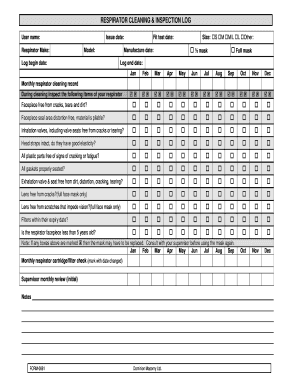
This guide provides detailed instructions on filling out the Form-0061, which is essential for maintaining records of respirator maintenance. Proper documentation helps ensure safety and compliance with regulations.
Follow the steps to complete the Form-0061 effectively.
- Click ‘Get Form’ button to obtain the form and open it in the editor. This action allows you to access the digital document needed for filling out your respirator maintenance records.
- Begin by entering the user name and the make of the respirator in the designated fields. Accurate identification helps in tracking the usage and maintenance of the specific equipment.
- Fill in the issue date and model of the respirator. Ensure this information is current, as it is crucial for record-keeping and compliance.
- Document the log begin date and log end date. This indicates the period for which you are maintaining the log, aiding in systematic tracking.
- Select the size of the respirator by marking the appropriate option (Small, Medium, Medium/Large, Large, or Other). Proper sizing is vital for effective protection.
- Record the fit test date. This date confirms that the respirator has been tested for a proper fit, ensuring the user's safety.
- Mark the respirator type as either ½ mask or full mask by checking the relevant box. This information assists in understanding the level of protection provided.
- Review and check off the condition of the facepiece and its components—such as cleanliness, seal area distortion, valves, straps, and plastic parts—by marking the corresponding boxes. This maintenance check is critical for safety.
- Ensure to assess the filters and confirm they are within their expiry date, as this directly impacts the effectiveness of the respirator.
- If any issues are noted by marking the boxes, consult with a supervisor before further use of the respirator, as indicated in the note section.
- Complete the monthly respirator cleaning record section with the date of cleaning, ensuring to mark any observations during the cleaning process.
- Lastly, secure the supervisor's review by obtaining their initials, which validates the maintenance check and compliance.
- Once all sections are completed, you can save changes, download, print, or share the form electronically for your records.
Complete your respirator maintenance log online today to enhance workplace safety and compliance.
EMPLOYER: Report the injury or illness to the WSIB by submitting Form 7 within 3 days after learning of your worker's injury or illness (as required by the Workplace Safety and Insurance Act).
Industry-leading security and compliance
US Legal Forms protects your data by complying with industry-specific security standards.
-
In businnes since 199725+ years providing professional legal documents.
-
Accredited businessGuarantees that a business meets BBB accreditation standards in the US and Canada.
-
Secured by BraintreeValidated Level 1 PCI DSS compliant payment gateway that accepts most major credit and debit card brands from across the globe.