Loading
Get Contractor Intake Form Dshs
How it works
-

Open form follow the instructions
-

Easily sign the form with your finger
-

Send filled & signed form or save
How to fill out the Contractor Intake Form Dshs online
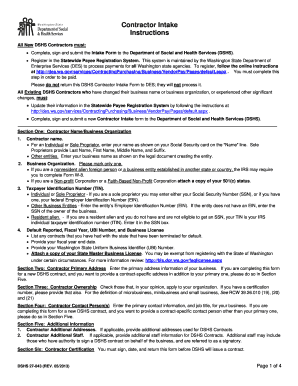
Filling out the Contractor Intake Form Dshs online is a crucial step for all new and existing contractors intending to work with the Department of Social and Health Services. This guide provides a clear and detailed approach to assist you in completing the form efficiently.
Follow the steps to accurately complete the Contractor Intake Form Dshs online.
- Click ‘Get Form’ button to obtain the form and open it in the editor.
- Complete Section One: Contractor Name/Business Organization. Enter your name or business name as applicable. Make sure to provide the correct format for individual sole proprietors and other entities.
- In Section One, specify your business organization type by marking only one of the provided options. If applicable, attach necessary documentation like your 501(c) status.
- Provide your Taxpayer Identification Number (TIN) in the designated section. Sole proprietors can use either their Social Security Number (SSN) or Employer Identification Number (EIN). Other entities should enter their EIN.
- Fill out the information regarding any contracts terminated for default, your fiscal year end date, and your Washington State Uniform Business Identifier (UBI) number. Attach a copy of your Master Business License if required.
- In Section Two, enter your primary business address along with relevant contact information, including email and phone number.
- Proceed to Section Three to indicate your business ownership type by checking applicable boxes based on your organization.
- Enter the primary contact person's information in Section Four, ensuring that the contact is authorized to sign contracts if applicable.
- In Section Five, provide any additional addresses or staff information relevant to DSHS contacts, including their signing authority if relevant.
- Complete Section Six by signing and dating the form, certifying that all statements are true. Ensure all necessary supporting documentation is attached.
- Finally, save your changes, download, print, or share the completed form as required for submission.
Take the next step and complete the Contractor Intake Form Dshs online to ensure your successful registration.
Visiting your local Community Service Office. Mailing DSHS Community Services Division, P.O. Box 11699, Tacoma, WA 98411-6699. Faxing to 888-338-7410.