Loading
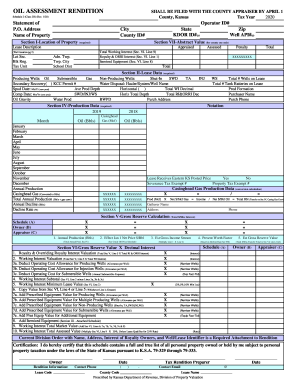
Get Ks Oil Assessment Rendition Schedule 2 (class 2b) 2020
How it works
-

Open form follow the instructions
-

Easily sign the form with your finger
-

Send filled & signed form or save
How to fill out the KS Oil Assessment Rendition Schedule 2 (Class 2B) online
Filling out the KS Oil Assessment Rendition Schedule 2 (Class 2B) correctly is essential for accurate reporting and compliance with tax regulations. This guide will provide you with user-friendly steps to complete the form online, ensuring that you provide all necessary information efficiently.
Follow the steps to complete your oil assessment rendition online.
- Press the ‘Get Form’ button to access the form and open it in your selected editor or platform.
- Begin by entering basic information in the Statement of Property section including your name, operator ID, and address details. Ensure the accuracy of the P.O. address, city, state, and zip code.
- In Section I, provide the location of the property, including well API numbers and the lease description, as these fields are required for the assessment.
- Move to Section II to detail the lease data. Include information regarding producing and non-producing wells, indicating their types, production depths, and any relevant permits.
- Fill out Section IV to report production data. List the monthly production figures for oil and gas, along with any necessary calculations related to annual production and decline rates.
- In Section V, calculate and document the gross reserve values and estimated income streams based on your production data. Ensure to reference the appropriate prices and factors for your calculations.
- Proceed to Section VI and summarize the valuations of royalty interests and working interests based on your calculated values. Complete any required deductive fields for operating costs.
- Fill out the certification section where the owner must affirm that the information is complete and accurate. Include the date, your contact information, and the details of the tax rendition preparer.
- Review your completed form for accuracy and completeness. After confirming that all fields are correctly filled, you can save the changes, download the form, and print it if needed, or share it with the relevant authorities.
Complete your KS Oil Assessment Rendition Schedule 2 (Class 2B) online today for a smooth filing experience.
Get form
Experience a faster way to fill out and sign forms on the web. Access the most extensive library of templates available.
Get This Form Now!
Use professional pre-built templates to fill in and sign documents online faster. Get access to thousands of forms.