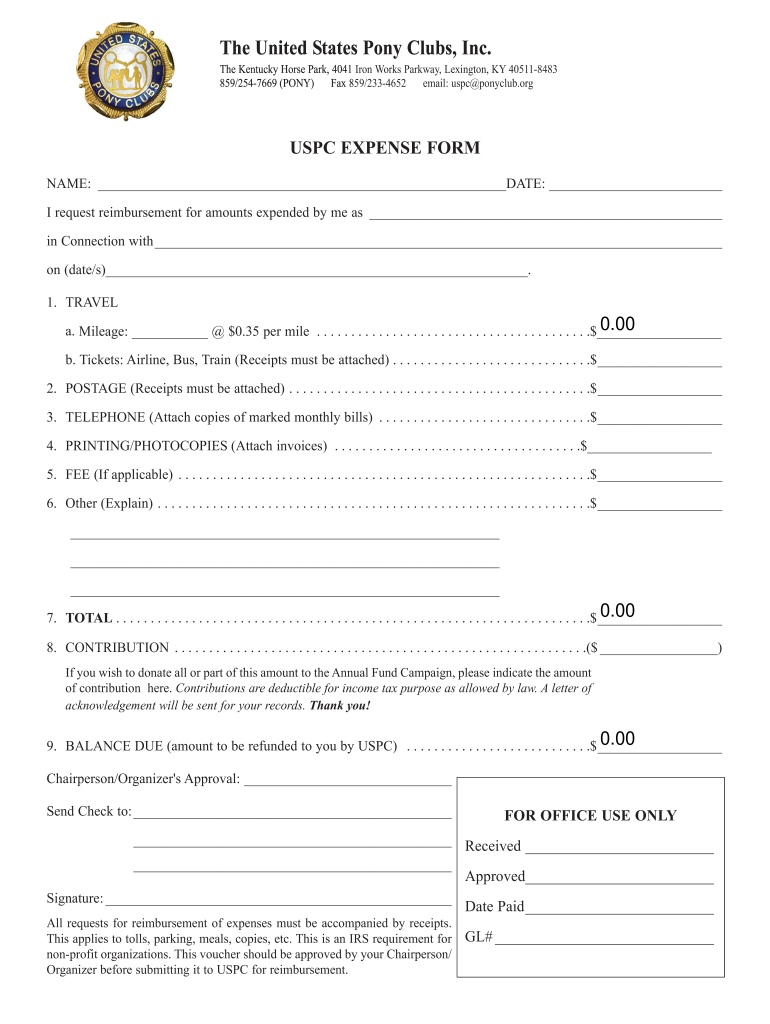
The United States Pony Clubs, Inc. The Kentucky Horse Park, 4041 Iron Works Parkway, Lexington, KY 405118483 859/2547669 (PONY) Fax 859/2334652 email: uspc ponyclub.orgUSPC EXPENSE FORM NAME: DATE:.
Loading

Open form follow the instructions

Easily sign the form with your finger

Send filled & signed form or save
How to fill out the KY Pony Club USPC Expense Form online
Filling out the KY Pony Club USPC Expense Form online is an essential step for users seeking reimbursement for expenses incurred during club-related activities. This guide provides clear and detailed instructions to help you complete the form efficiently.
Follow the steps to fill out the expense form correctly
- Press the ‘Get Form’ button to access the expense form and open it in your document editor.
- Enter your name and the date in the designated fields at the top of the form.
- In the section labeled 'I request reimbursement for amounts expended by me as', specify your role or position.
- Describe the purpose of the expense in the section 'in connection with', providing context for the reimbursement request.
- Fill in the 'Travel' section, detailing the mileage and corresponding amounts, including tickets for any travel with receipts attached.
- Complete the 'Postage' section by entering the amount spent, ensuring you attach receipts as required.
- For the 'Telephone' section, attach copies of your marked monthly bills and input the total amount spent.
- In the 'Printing/Photocopies' field, include the total amount along with the necessary invoices.
- If applicable, state any fees incurred in the designated 'Fee' section.
- For 'Other' expenses, provide an explanation along with the corresponding amount.
- Calculate and enter the total amount of your expenses in the 'Total' field.
- If you wish to contribute to the Annual Fund Campaign, indicate your contribution amount.
- Finally, calculate the 'Balance Due', representing the amount to be refunded to you by USPC.
- Obtain the approval of your Chairperson or Organizer by having them sign in the designated area.
- Before submitting the form, ensure all receipts are attached and verify all fields are correctly filled out.
- Once completed, save your changes, and opt to download, print, or share the form as required.
Start completing your forms online today for a smooth reimbursement process.
Experience a faster way to fill out and sign forms on the web. Access the most extensive library of templates available.
Related content
years later, this past summer I took him to Kentucky for the Pony Club ... such ongoing...
Sep 15, 2020 — including Pony Club, dressage and eight years of ... in a situation –...
Get answers to your most pressing questions about US Legal Forms API.
How can I stop receiving email notifications for every online payment I receive?
How can I stop receiving email notifications for every online payment I receive? Navigate to Settings > Preferences > Invoices. Now, under the Payments section you can choose to enable or disable the option to receive email notifications. Finally, click Save.
What happens if I delete payment profile?
Closing your Google payments profile removes your transaction and payment information permanently. You cannot re-open a closed payments profile.
What happens if I close payment profile on Google?
Closing your Google payments profile removes your transaction and payment information permanently. You cannot reopen a closed payments profile. Important: If you close your payments profile, you cannot: Buy things from Google Play or other Google products.
How do I change my payment user?
Updating payments profile users and notification settings Access the payments profile Settings page using either the Google Cloud console or Google payments center. On the payments settings page, under Payments users, click Manage payments users. On the Manage users page, choose + Add a new user.
How do I change my payment settings?
How to change your payment method while making a purchase On your Android phone or tablet, open the Google Play Store app . Go to a paid item's detail page. Tap the price and review app permissions. Under the app name, tap the Down arrow. ... Choose from one of your existing payment methods or add a new one.
How do I unlink a payment profile?
If you have multiple payments profiles, first select the profile that you want to close by following these steps: Sign in to the payments profile. Select the payments profile that you want to close. Continue to the Close your payments profile tool.
How do I get rid of update payment details on Iphone?
Open the Settings app. Tap your name. Tap Payment & Shipping. Tap Edit, tap the red Delete button, then tap Remove.
How do I delete payment profile?
To close your Google payments profile: Optional: If you have multiple profiles, go to pay.google.com and make sure you're signed in to the profile you want to close. Go to payments.google.com Settings. Under “Payments profile status,” select Close payments profile. Follow the on-screen instructions.
Use professional pre-built templates to fill in and sign documents online faster. Get access to thousands of forms.
If you believe that this page should be taken down, please follow our DMCA take down process here.