Loading
Get 360 Web International Fuel Online
How it works
-

Open form follow the instructions
-

Easily sign the form with your finger
-

Send filled & signed form or save
How to fill out the 360 Web International Fuel Online online
Filling out the 360 Web International Fuel Online form is a crucial step for individuals and businesses involved in fuel taxation. This guide offers clear and comprehensive instructions to ensure you complete the form accurately and efficiently.
Follow the steps to complete your fuel tax return effectively.
- Click ‘Get Form’ button to obtain the form and open it in the editor.
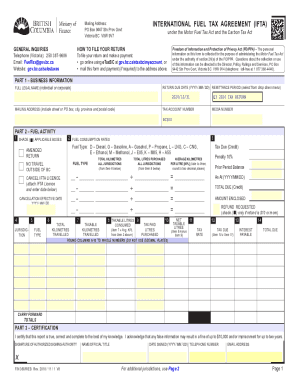
- Begin with Part 1 – Business Information. Fill in your full legal name, select the return due date in YYYY/MM/DD format, and choose the remittance period from the dropdown menu. Ensure to include your complete mailing address.
- In Part 2 – Fuel Activity, shade the applicable box to indicate whether you traveled outside of British Columbia. List the fuel type utilized, the jurisdiction, total kilometers traveled, and taxable kilometers traveled. Carefully enter the taxable litres consumed and average kilometers per litre, rounding to two decimal places as needed.
- Continue in Part 2 by providing details for tax due or credits. Calculate the tax due by applying the tax rate to your net taxable litres, and complete any necessary prior period balance or refund requested.
- In Part 3 – Certification, sign the form to certify that the information provided is accurate. Include your name or official title, date signed, and contact telephone number.
- Finally, save changes to your completed form. You can also download, print, or share the document as needed.
Complete your 360 Web International Fuel Online form today for a seamless documentation experience.
Get form
Experience a faster way to fill out and sign forms on the web. Access the most extensive library of templates available.
Get This Form Now!
Use professional pre-built templates to fill in and sign documents online faster. Get access to thousands of forms.