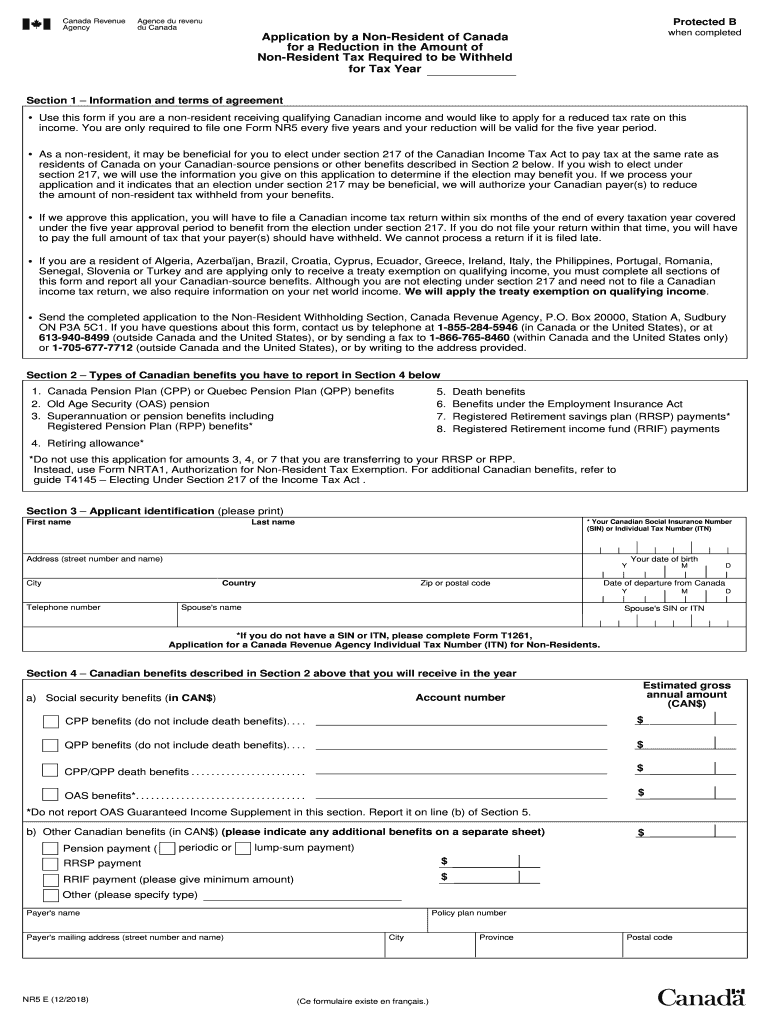
Greement Use this form if you are a non-resident receiving qualifying Canadian income and would like to apply for a reduced tax rate on this income. You are only required to file one Form NR5 every five years and your reduction will be valid for the five year period. As a non-resident, it may be beneficial for you to elect under section 217 of the Canadian Income Tax Act to pay tax at the same rate as residents of Canada on your Canadian-source pensions or other benefits described in S.

Open form follow the instructions

Easily sign the form with your finger

Send filled & signed form or save
How to fill out the Canada NR5 E online
The Canada NR5 E form is essential for non-residents seeking a reduction in the non-resident tax withheld on their Canadian income. This guide provides a clear, step-by-step approach to filling out the form online, ensuring you understand each component and requirement.
Follow the steps to complete your Canada NR5 E application.
- Click ‘Get Form’ button to access the NR5 E form and open it in your preferred editor.
- Fill in Section 1 with your personal information and terms of agreement. Include multiple types of qualifying Canadian income and the tax year relevant to your application.
- In Section 2, identify the types of Canadian benefits you are receiving. This may include benefits such as Canada Pension Plan or Old Age Security pension.
- Complete Section 3 with your identification details. Provide your last name, first name, Social Insurance Number (SIN) or Individual Tax Number (ITN), date of birth, and contact information.
- Move to Section 4 and accurately report the Canadian benefits you receive. List each type and include estimated gross annual amounts for the various benefit categories.
- In Section 5, provide information on your net world income. This includes all other Canadian-source and foreign-source income that may require a tax return.
- Complete Section 6 by answering questions regarding non-refundable tax credits, and provide details about dependents if applicable.
- Fill in Section 7 if you have dependents, providing their names, addresses, and any relevant financial information.
- Finally, certify the accuracy of your information in Section 8 by signing and dating the form.
- After completing the application, save any changes made, and consider downloading or printing a copy for your records.
Begin your online application for the Canada NR5 E form now.
Experience a faster way to fill out and sign forms on the web. Access the most extensive library of templates available.
Related content
Aug 10, 2018 · Hawaii Nonresident and Part-Year Resident Income Tax Forms and ... tests...
Feb 11, 2020 — partment of the Treasury and the IRS to amend the section 871(m) ... tion...
The Leopard 2 was used in Kosovo with the German Army, and has seen action in Afghanistan...
Use professional pre-built templates to fill in and sign documents online faster. Get access to thousands of forms.
If you believe that this page should be taken down, please follow our DMCA take down process here.
This form is available in several versions. Select the version you need from the drop-down list below.