Loading
Get Canada Gst71 E 2019-2026
How it works
-

Open form follow the instructions
-

Easily sign the form with your finger
-

Send filled & signed form or save
How to fill out the Canada GST71 E online
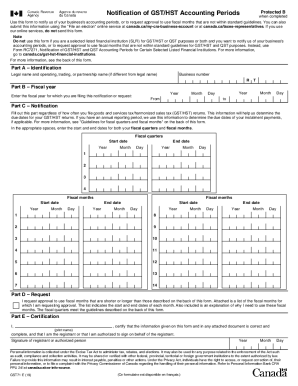
The Canada GST71 E form is essential for notifying the Canada Revenue Agency of your business's accounting periods or requesting approval for non-standard fiscal months. This guide will provide you with a clear, step-by-step approach to completing the form online, ensuring that all necessary information is accurately provided.
Follow the steps to effectively complete the Canada GST71 E online.
- Click ‘Get Form’ button to obtain the form and open it in the editor.
- In Part A – Identification, enter your legal name, and if applicable, the operating, trading, or partnership name. Additionally, provide your business number.
- Proceed to Part B – Fiscal Year. Fill in the fiscal year for which you are filing this notification. Specify the start and end dates of your fiscal year.
- In Part C – Notification, regardless of your filing frequency, enter the start and end dates for both your fiscal quarters and fiscal months. Ensure all dates are accurate to help determine due dates for your returns.
- If you are requesting approval for fiscal months that are not in line with standard guidelines, complete Part D – Request. Attach a list of the requested fiscal months with the reasons for your request.
- Finally, in Part E – Certification, provide your name and certify that all information is correct. Remember to sign and date the form.
- Once completed, save any changes made to the form. You can then download, print, or share the form as needed.
Complete your documents online to ensure timely processing and accurate submissions.