Loading
Get Au Nat 13471 2019-2026
How it works
-

Open form follow the instructions
-

Easily sign the form with your finger
-

Send filled & signed form or save
How to fill out the AU NAT 13471 online
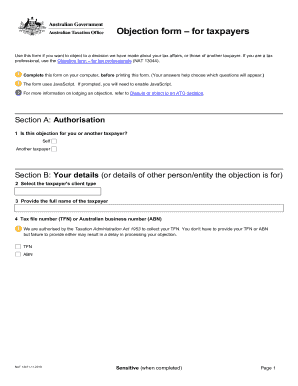
The AU NAT 13471 form is essential for individuals wishing to object to a decision regarding their tax affairs. This guide provides step-by-step instructions on how to complete the form online, ensuring a smooth submission process.
Follow the steps to fill out the AU NAT 13471 correctly.
- Click ‘Get Form’ button to obtain the form and open it in your preferred editor.
- Begin by indicating whether the objection is for yourself or another taxpayer in Section A. Choose between 'Self' or 'Another taxpayer'.
- In Section B, provide the necessary details of the taxpayer, including their client type, full name, and their tax file number (TFN) or Australian business number (ABN). Remember, providing these details can expedite your objection process.
- Fill out Section C with the contact details for the person the ATO should reach out to regarding the objection. Include a contact name, their title, family name, and other personal identifiers such as phone and email.
- In Section D, specify what your objection is mainly about in question 7a. Then identify the kind of decision you are objecting to in question 7b.
- Answer whether your objection includes the issue of penalties and interest in question 7c. Note that some decisions are not open to objection.
- For questions 8a and 8b, provide the reference number and the date of the earliest decision or assessment you are challenging. It's also crucial to state whether you wish the Commissioner to consider your objection as timely if it is out of time.
- In question 9a, articulate why you believe the ATO's decision is incorrect. Provide a thorough explanation, detailing all necessary facts, years involved, and any supporting research.
- If applicable, inform the ATO about any personal difficulties related to your dispute in question 9b for consideration under the Dispute Assist service.
- Gather and attach any supporting evidence or documents in Section 10, as they may facilitate a quicker decision regarding your objection.
- Finally, in Section E, sign and date the form accordingly. Ensure all parts of the form are complete to avoid delays.
- You can lodge this form via the Business Portal, fax, or post. If using fax or post, use the specified contact details for submission.
- After you have completed your form, save your changes, download, print, or share the form as needed.
Encourage your peers to navigate the AU NAT 13471 filing process confidently by completing your documents online.