Loading
Get Irsc Loan Cancellation Form 2019-2026
How it works
-

Open form follow the instructions
-

Easily sign the form with your finger
-

Send filled & signed form or save
How to fill out the IRSC Loan Cancellation Form online
This guide provides a clear and user-friendly process for completing the IRSC Loan Cancellation Form online. Whether you are seeking to cancel a subsidized or unsubsidized loan, these step-by-step instructions will assist you in navigating the form with ease.
Follow the steps to complete your loan cancellation form online.
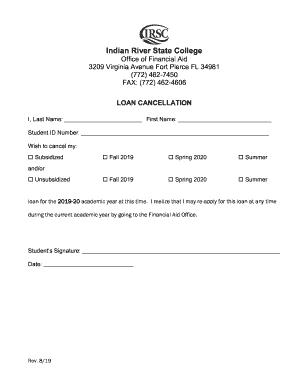
- Press the ‘Get Form’ button to retrieve the IRSC Loan Cancellation Form and open it in your preferred editing tool.
- Begin by entering your last name in the designated field. Ensure it is spelled correctly, as this will be tied to your student record.
- Next, input your first name in the appropriate field. Again, accuracy is important for your identification.
- Proceed to provide your student ID number in the given space. This should be the number assigned to you by the college.
- Select the type of loan you wish to cancel by marking the appropriate box for either Subsidized or Unsubsidized. You can choose one or both, depending on your needs.
- Indicate the semesters for which you wish to cancel the loan(s) by checking the relevant box(es): Fall 2019, Spring 2020, or Summer. Ensure that these correspond with your records.
- At the bottom of the form, sign your name in the designated area to confirm your request for cancellation.
- Finally, enter the date on which you are completing the form. Ensure that this reflects the current date.
- Once all fields are filled out accurately, save your changes. From here, you can download, print, or share the form as needed.
Complete your IRSC Loan Cancellation Form online today to ensure a smooth cancellation process.