Loading
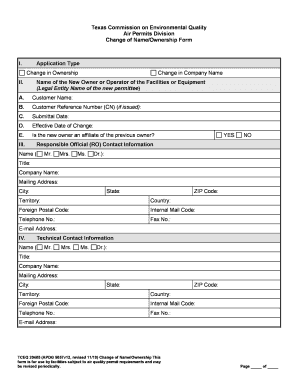
Get Tx Tceq 20405 2019-2026
How it works
-

Open form follow the instructions
-

Easily sign the form with your finger
-

Send filled & signed form or save
How to fill out the TX TCEQ 20405 online
The TX TCEQ 20405 form is essential for notifying changes in ownership or company name for facilities regulated under air quality permits. This guide provides clear, step-by-step instructions to assist users in completing the form online effectively.
Follow the steps to fill out the TX TCEQ 20405 form online.
- Click ‘Get Form’ button to obtain the form and open it in the editor.
- Select the application type by checking the appropriate box for either 'Change in Ownership' or 'Change in Company Name'.
- Enter the legal name of the new owner or operator under 'Customer Name'. Ensure this matches the name verified by the Texas Secretary of State.
- If assigned, input the Customer Reference Number (CN), which is a unique identifier by TCEQ for the entity.
- Provide the Submittal Date, ensuring it reflects the date of the application submission (MM/DD/YYYY). This should not precede the Effective Date of Change.
- Specify the Effective Date of Change, which is when the new customer took over ownership of the facility.
- Indicate whether the new owner is an affiliate of the previous owner by checking 'Yes' or 'No'.
- Fill in the Responsible Official (RO) contact information, including name, title, company name, mailing address, phone number, and email.
- Complete the Technical Contact Information section in a similar manner, providing the tech contact's details.
- Under the Site Information section, provide the Site Name and any relevant assigned numbers (RN and Account Number, if applicable).
- Answer questions on site ownership transfer regarding whether it applies to the entire site or a portion and the status of pollutants involved.
- List any affected NSR and FOP authorizations. Ensure to comply with any prior registrations and obtain necessary transfer documents.
- Certify the conditions required for NSR and FOP changes, confirming compliance with pollution emissions and ownership conditions.
- Complete the authorization section with the responsible official’s signature and date, ensuring accuracy in the information provided.
- Finally, review your entries for accuracy. Once confirmed, you may save changes, download, print, or share the completed form as necessary.
Complete your TX TCEQ 20405 form online today to ensure compliance with air quality permit regulations.