Loading
Get Tx Tdlr Elc003 2019-2026
How it works
-

Open form follow the instructions
-

Easily sign the form with your finger
-

Send filled & signed form or save
How to fill out the TX TDLR ELC003 online
Filling out the TX TDLR ELC003 online can be a straightforward process with the right guidance. This comprehensive guide is designed to provide clear and detailed steps to assist you in completing your application accurately and efficiently.
Follow the steps to successfully complete your application.
- Click ‘Get Form’ button to obtain the form and open it in the editor.
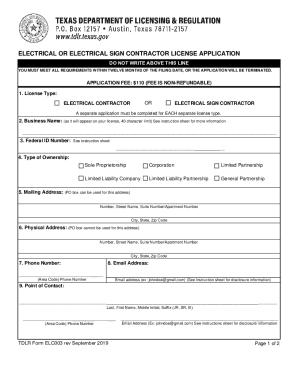
- Select the license type you are applying for by checking the appropriate box for either 'Electrical Contractor' or 'Electrical Sign Contractor'.
- Enter your business name as it will appear on your license, ensuring it does not exceed 40 characters. If you have multiple business names, note that an assumed name certificate is required for your records.
- Input your federal ID number as assigned to your business. You can find more information about obtaining this number at the IRS website.
- Indicate the type of ownership of your business by checking the appropriate box for your organization type.
- Provide your current mailing address. A PO Box is acceptable. Including the zip plus-4 can enhance mail delivery accuracy.
- Enter your physical business address, ensuring it does not contain a PO Box.
- Fill in your phone number, including the area code, where you can be reached during the day.
- Provide your email address, consenting to receive licensing communications electronically. Make sure to maintain accuracy, as this information is treated confidentially, as allowed by law.
- Identify a point of contact by entering their information, including name, phone number, and email address.
- Attach proof of your general liability insurance that meets the required coverage, and ensure the business name matches what is stated in the application.
- For Workers’ Compensation Insurance, select your status regarding coverage and provide relevant information or documentation.
- Have a master electrician or master sign electrician complete their section, including their signature and license details, ensuring compliance with Texas licensing laws.
- Carefully read the statement of owner section and sign where indicated to affirm your understanding and compliance.
- Finalize your application by reviewing all entries for accuracy, then save any changes, download the completed form, and prepare it for submission.
Begin filling out your TX TDLR ELC003 online today to ensure a smooth application process.