Loading
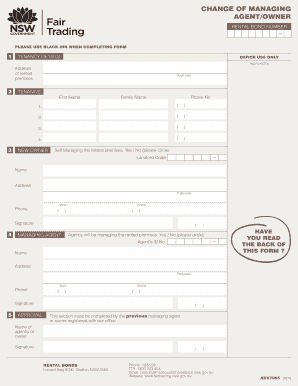
Get Au Nsw Adv7065 2019-2026
How it works
-

Open form follow the instructions
-

Easily sign the form with your finger
-

Send filled & signed form or save
How to fill out the AU NSW ADV7065 online
Filling out the AU NSW ADV7065 form is essential for notifying the relevant authorities about changes in property management or ownership. This guide provides a comprehensive, step-by-step approach designed to support users through the online completion of this important document.
Follow the steps to fill out the AU NSW ADV7065 online effectively.
- Press the ‘Get Form’ button to access the document and launch it in the editor.
- In the tenancy details section, enter the address of the rented premises and the applicable postcode. Ensure to include the Rental Bond Number, as it is crucial for processing your request.
- List the first names and family names of all tenants in the tenant/s section. Include their respective phone numbers to ensure accurate communication.
- In the new owner section, indicate whether the new owner is self-managing the rented premises by circling 'Yes' or 'No.' Provide the new owner's name, address, postcode, work phone, and home phone.
- Complete the managing agent section by indicating whether the agency will be managing the rented premises. Again, circle 'Yes' or 'No.' Fill in the required details about the managing agent, including their ID number, name, address, postcode, and phone numbers.
- In the approval section, ensure that the previous managing agent or owner, registered with the office, signs the form to confirm the change.
- Review the information provided on the form for accuracy and completeness. If everything is correct, proceed to save, download, print, or share the form as necessary.
Complete your AU NSW ADV7065 online now for a smoother rental bond management process.