Loading
Get Canada Hlth 170 2019-2026
How it works
-

Open form follow the instructions
-

Easily sign the form with your finger
-

Send filled & signed form or save
How to fill out the Canada HLTH 170 online
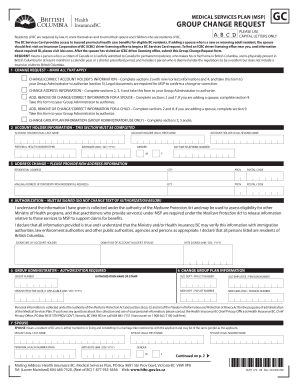
The Canada HLTH 170 form is essential for managing changes regarding your medical services enrollment in British Columbia. This guide provides a clear, step-by-step process for users looking to fill out this form online, ensuring that you complete each section accurately and efficiently.
Follow the steps to complete the Canada HLTH 170 online.
- Click ‘Get Form’ button to obtain the form and open it in the editor.
- Read the instructions regarding changes to your account or adding a spouse or child, and ensure you have the necessary documentation ready.
- In section 1, mark all applicable change requests for your account or family members.
- Complete section 2 with the account holder's information, ensuring that you provide your legal last name, first name, personal health number, birthdate, gender, second name (if applicable), and daytime telephone number.
- If you're changing your address, fill out section 3 with your new residential address, city, province, and postal code. If your mailing address differs, provide that as well.
- In section 4, sign the authorization statement confirming the truthfulness of the information provided. Include the date of signing.
- Proceed to section 5 to complete the authorization by the group administrator, if required.
- If applicable, fill out section 6 with group plan information. Ensure you provide all corresponding details such as group number and effective date.
- If adding or modifying spouse information, complete section 7 by providing the spouse’s legal name, personal health number, birthdate, gender, and any other requested details.
- For children, complete section 8 with the child’s legal name, health number, birthdate, gender, and address. Include any necessary legal documents.
- Lastly, review the entire form for completeness and accuracy. You may save changes, download, print, or share the filled form as needed.
Complete your Canada HLTH 170 form online today to ensure the timely processing of your medical services changes.