Loading
Get Wa Dlr-430-510 2019-2026
How it works
-

Open form follow the instructions
-

Easily sign the form with your finger
-

Send filled & signed form or save
How to fill out the WA DLR-430-510 online
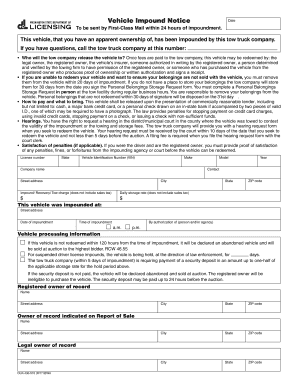
The WA DLR-430-510 form is used for documenting vehicle impoundment details and facilitating the redemption process. This guide provides clear and supportive instructions to help users successfully complete this form online.
Follow the steps to complete the form online.
- Click ‘Get Form’ button to obtain the form and open it in the editor.
- Begin filling out the date of the notice at the top of the form. Ensure that you enter the correct date to avoid any discrepancies.
- In the section labeled 'Vehicle Information', provide details such as the vehicle identification number (VIN), make, model, year, and license number. It is important to ensure accuracy to assist in the identification of the vehicle.
- Fill in the contact information of the owner, including street address, city, state, and ZIP code. This helps establish clear communication regarding the impounded vehicle.
- Document the charges associated with the impoundment, including the impound/recovery/tow charge and daily storage rate. These amounts should be clear, as they are critical for the payment process.
- Indicate where the vehicle was impounded by providing the address, including the state and ZIP code. This information is necessary for record-keeping and further inquiries.
- Specify the date and time of impoundment. Providing this information accurately will support any retrieval or hearings regarding the vehicle.
- In the section concerning the authorization, note who authorized the towing, whether it is an individual or agency. This helps in establishing accountability.
- If applicable, complete the section regarding the registered owner of record and legal owner of record, including their name and address details. This will ensure proper documentation of ownership.
- Once all fields are completed, review the form carefully for any errors or omissions. After confirming accuracy, users can save changes, download, print, or share the form as needed.
Start filling out your documents online today!