Loading
Get Au Form 22 2019-2026
How it works
-

Open form follow the instructions
-

Easily sign the form with your finger
-

Send filled & signed form or save
How to fill out the AU Form 22 online
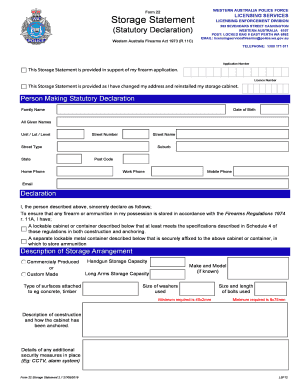
The AU Form 22 is a crucial document used in compliance with the Western Australia Firearms Act 1973, serving as a storage statement for firearm applications. This guide provides a clear and structured approach to filling out the form online, ensuring users can complete it accurately and efficiently.
Follow the steps to fill out the AU Form 22 online successfully.
- Click 'Get Form' button to obtain the form and open it in your chosen editor.
- Begin by filling in the application number and licence number where indicated at the top of the form.
- Provide personal information in the 'Person Making Statutory Declaration' section, including family name, date of birth, all given names, address details (unit/lot/level, street number, street name, street type, state, suburb, and post code), and contact information (home, work, mobile phone, and email).
- In the declaration section, confirm the safe storage of firearms and ammunition by checking the box and providing relevant details about the storage cabinet/container, including its construction, anchoring, and any additional security measures such as CCTV or alarm systems.
- Describe the storage arrangement by indicating if the cabinet/container is commercially produced or custom made, and list the specifications, including handgun and long arms storage capacities, type of surfaces used for anchoring, sizes of washers and bolts utilized.
- If applicable, complete the 'Alternate Storage Arrangement' section by specifying whether the storage location is the same as your residential address and providing further details if it is not.
- Complete the statutory declaration by ensuring all necessary proof of purchase and photographs of the approved storage facility are attached. Sign and date the declaration, then have an authorised witness sign it in your presence.
- After filling out the form completely, save your changes. You can then download, print, or share the completed form as needed.
Complete your forms online for a smoother experience.