Loading
Get Canada Atrf Employee Termination Notice 2020-2026
How it works
-

Open form follow the instructions
-

Easily sign the form with your finger
-

Send filled & signed form or save
How to fill out the Canada ATRF Employee Termination Notice online
Filling out the Canada ATRF Employee Termination Notice is an important step for individuals transitioning from their teaching positions. This guide aims to provide clear instructions on how to complete the form online, ensuring a smooth and efficient process.
Follow the steps to complete your Employee Termination Notice online.
- Click ‘Get Form’ button to access the Canada ATRF Employee Termination Notice and open it in the editor.
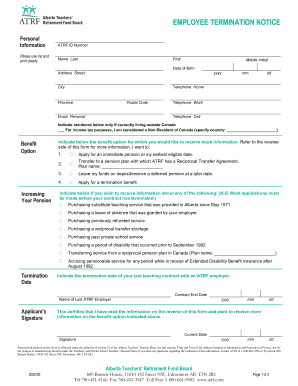
- Fill in your personal information, including your ATRF ID number, full name (last, first, and middle initial), date of birth, address, and contact numbers. Ensure all entries are clear and accurate.
- Indicate your residency status. If currently living outside Canada, check the appropriate box and specify your country as required.
- Choose your benefit option by checking one of the listed options. If applying for a pension, specify if you wish to transfer, leave funds on deposit, or apply for a termination benefit.
- If applicable, indicate any additional information you require regarding purchasing teaching service or transferring service from another plan.
- Provide the termination date of your last teaching contract with an ATRF employer, as well as the name of your last employer.
- Sign and date the form, certifying that you have read and understood the information provided.
- Once all sections are completed, save your changes and download or print the form for your records. Ensure you forward the completed form directly to ATRF.
Complete your Canada ATRF Employee Termination Notice online today to ensure a smooth transition.