Loading
Get Sfsu Request For Change/declaration Of Undergraduate Minor 2020-2026
How it works
-

Open form follow the instructions
-

Easily sign the form with your finger
-

Send filled & signed form or save
How to fill out the SFSU Request For Change/Declaration Of Undergraduate Minor online
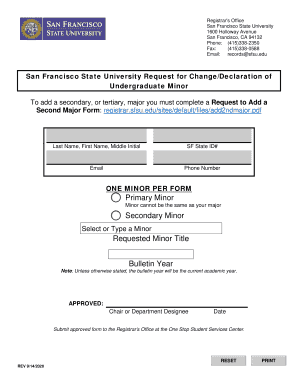
Filling out the SFSU Request For Change/Declaration Of Undergraduate Minor is an essential step for students looking to declare or change their minor at San Francisco State University. This guide provides clear and supportive instructions to help you successfully complete the form online.
Follow the steps to fill out the form accurately and efficiently.
- Click ‘Get Form’ button to obtain the form and open it for editing.
- Enter your last name, first name, and middle initial in the designated fields to ensure proper identification.
- Provide your SF State ID number, which is necessary for processing your request.
- Fill in your email address and phone number so the Registrar's Office can contact you regarding your application.
- Remember that only one minor can be declared per form, so ensure you are focused on a single request.
- Select your primary minor from the options provided, making sure that it does not duplicate your major.
- If applicable, indicate a secondary minor by selecting or typing the minor you wish to add.
- Fill in the requested minor title to clarify which minor you are declaring.
- Note the bulletin year, which will default to the current academic year unless otherwise specified.
- Once all fields have been filled out, submit the form for approval from the chair or department designee.
- After obtaining the necessary approval, submit the document to the Registrar’s Office at the One Stop Student Services Center.
- Finally, ensure the document is saved, and consider downloading or printing it for your records.
Complete your documents online today to ensure a smooth process!