Loading
Get Ks Form Opl-1 2020-2026
How it works
-

Open form follow the instructions
-

Easily sign the form with your finger
-

Send filled & signed form or save
How to fill out the KS Form OPL-1 online
Filling out the KS Form OPL-1 online is a straightforward process that requires attention to detail. This guide will walk you through each section of the form to ensure your application is completed accurately and efficiently.
Follow the steps to complete the KS Form OPL-1 online.
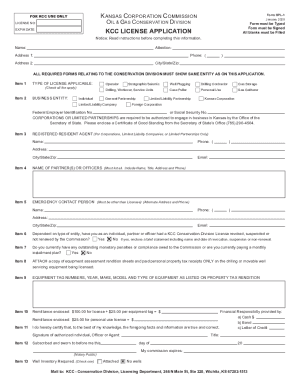
- Click ‘Get Form’ button to access the KS Form OPL-1 and open it for editing. Ensure that you are using a compatible device to fill out the form online.
- Begin with the KCC License Application section. Fill in your name, attention, and address details accurately. Ensure that all required fields are complete.
- For Item 1, check the applicable type of license for your operation. This may include options such as Operator, Drilling Contractor, or Gas Gatherer.
- In Item 2, select your business entity type, which could be an Individual, General Partnership, Limited Liability Company, or others as applicable. Also, enter your Federal Employer Identification Number or Social Security Number.
- Complete Item 3 by providing the name and contact information for your Registered Resident Agent if your business is a corporation or partnership.
- For Item 4, list all partners or officers, ensuring to include their names, titles, addresses, and phone numbers.
- Item 5 requires an emergency contact who is separate from the licensee. Provide their name, address, phone number, and email.
- In Items 6 and 7, indicate whether you or any partner has had a KCC License revoked, suspended, or if you have any outstanding penalties owed to the Commission.
- Attach required documentation as stated in Item 8, which includes copies of equipment assessment sheets and tax receipts.
- For Item 9, enter the equipment tag numbers, year, make, model, and type as listed on your property tax rendition.
- Item 10 requires you to calculate your total remittance based on the license fees and any equipment tags. Ensure you provide the correct total amount.
- Sign the application in Item 11, certifying that the information provided is true and correct. This signature must be from an authorized individual.
- In Item 12, ensure your signature is notarized as required.
- For Item 13, indicate if a well inventory is attached. If you operate no wells, select that option.
- Once you have completed filling in all sections, review your form carefully for accuracy before proceeding to save your changes, download, or print the finished document.
Ensure your KS Form OPL-1 is completed accurately by following these steps and submit your application online today.