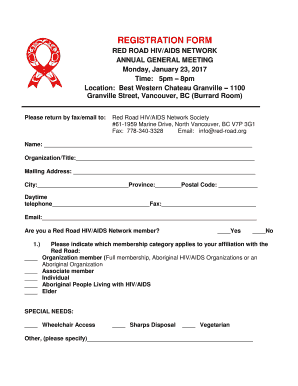
REGISTRATION FORM RED ROAD HIV/AIDS NETWORK ANNUAL GENERAL MEETING Monday, January 23, 2017 Time: 5pm 8pm Location: Best Western Chateau Granville 1100 Granville Street, Vancouver, BC (Burrard Room).
Open form follow the instructions
Easily sign the form with your finger
Send filled & signed form or save
How to fill out the Registration Form - Red Road HIV/AIDS Network online
Filling out the Registration Form for the Red Road HIV/AIDS Network is an essential step for participation in their Annual General Meeting. This guide provides detailed instructions to ensure that users can easily complete the form online.
Follow the steps to complete your Registration Form online.
- Click the ‘Get Form’ button to access the Registration Form, which will open the document for your completion.
- Begin filling out your name in the designated field. Ensure that your name is accurate for identification purposes.
- Enter your organization or title, providing relevant information about your affiliation.
- Fill in your mailing address completely, including the city, province, and postal code. This information is necessary for correspondence.
- Include your daytime telephone number and fax number if applicable. This information aids in communication.
- Provide your email address in the appropriate section, ensuring that it is correct for electronic communication.
- Indicate whether you are a member of the Red Road HIV/AIDS Network by selecting 'Yes' or 'No'.
- Choose the relevant membership category that applies to you. Options include Organization member, Associate member, Individual, Aboriginal People Living with HIV/AIDS, or Elder.
- Address any special needs by checking the appropriate boxes for wheelchair access, sharps disposal, vegetarian preferences, or specify other needs in the provided space.
- Once you have completed all fields, review your entries for accuracy, then save the changes to your form.
- Finally, download, print, or share the form as needed. Make sure to return it via fax or email as indicated in the contact information.
Complete your Registration Form online today for seamless participation!
Experience a faster way to fill out and sign forms on the web. Access the most extensive library of templates available.
Related content
The AIDS Education and Training Centers Program, which supports a network of eight...
Yunnan/Australian Red Cross Youth Peer Education for HIV/AIDS. Prevention ... The...
Joan Alexandra Molinsky (June 8, 1933 – September 4, 2014), known professionally as Joan...
Get answers to your most pressing questions about US Legal Forms API.
What are the secured payment methods?
1. Credit cards. The most familiar form of online payment is also one of the most secure payment methods. Credit card transactions are encrypted, which means the details are jumbled up and encoded.
What is the most secure payment platform?
Our picks for the best payment gateways Stripe: Best overall payment gateway. Adyen: Best omnichannel option. Helcim: Best interchange-plus pricing for businesses of all sizes. PayPal Payflow: Best for doing everything in one place. Square: Best if you also have a storefront.
How do you secure payments from clients?
Get an SSL certificate for your website SSL stands for Secure Sockets Layer. It is a security technology that encrypts communication between the customer's web browser and payment service provider. All web browsers support SSL. If your business website is directly processing a transaction, SSL must be installed.
How do I know if a payment page is secure?
Before entering payment card details on a website, ensure that the link is secure, in two ways: There should be a padlock symbol in the browser window frame, which appears when you attempt to log in or register. Be sure that the padlock is not on the page itself … this will probably indicate a fraudulent site.
How do I secure my payment page?
10 best practices for secure online payment processing Understand your PCI compliance requirements. ... Encrypt data with TLS. ... Implement 3D Secure 2. ... Multi- or Two-Factor Authentication. ... Require Card Verification Value (CVV) ... Use payment ization. ... Ensure your website platform is secure. ... Implement a fraud detection tool.
Use professional pre-built templates to fill in and sign documents online faster. Get access to thousands of forms.
If you believe that this page should be taken down, please follow our DMCA take down process here.