Loading
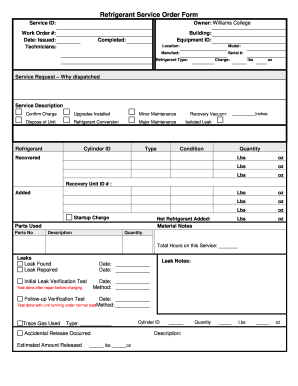
Get Williams College Refrigerant Service Order
How it works
-

Open form follow the instructions
-

Easily sign the form with your finger
-

Send filled & signed form or save
How to fill out the Williams College Refrigerant Service Order online
Filling out the Williams College Refrigerant Service Order online can streamline the process of managing refrigerant services. This guide provides clear instructions to help you navigate each section of the form effectively.
Follow the steps to complete the Refrigerant Service Order form.
- Press the ‘Get Form’ button to access the form and open it in your preferred editor.
- Begin by entering the service ID and work order number at the top of the form. These identifiers help track your request.
- Fill in the date issued to indicate when the service order is being created.
- List the names of the technicians who will be performing the service.
- Specify the building and equipment ID related to the service request. This ensures the right location and equipment are identified.
- Indicate whether the job is completed by marking the appropriate field.
- Provide the model, manufacturer, and serial number of the equipment requiring service.
- Select the type of refrigerant being used from the relevant field.
- Input the charge of refrigerant in pounds (lbs) and ounces (oz) as applicable.
- In the service request section, explain why the service was dispatched by choosing from options such as upgrades installed or major maintenance.
- Add any relevant notes in the material notes section regarding parts used including part numbers, descriptions, and quantities.
- Document the total hours spent on this particular service.
- If there were any leaks, indicate whether a leak was found and repaired, and add notes as necessary.
- Record the dates of initial leak verification tests and follow-up verification tests, along with the methods used.
- If an accidental release occurred, fill in the estimated amount released and details about the cylinder.
- Once all fields are completed, review the form for accuracy. You can then save changes, download the document, print it, or share it as needed.
Complete the Refrigerant Service Order form online to ensure efficient and effective service management.
HTTP security headers are designed to protect against a wide range of common web attacks. Some examples of threats that can be mitigated using security headers include cross-site scripting attacks, drive-by malware downloads, and cross-site request forgery (CSRF) attacks.