Loading
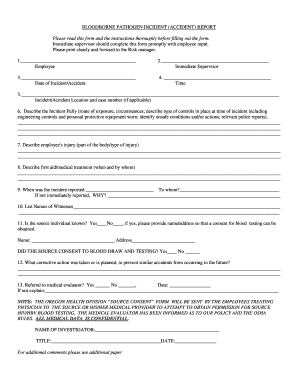
Get Bloodborne Pathogen Incident (accident) Report - Co Douglas Or
How it works
-

Open form follow the instructions
-

Easily sign the form with your finger
-

Send filled & signed form or save
How to fill out the bloodborne pathogen incident (accident) report - Co Douglas Or online
Filling out the bloodborne pathogen incident report is a critical step in ensuring workplace safety and compliance with regulations. This guide will provide you with a clear and structured approach to complete the report online effectively.
Follow the steps to accurately complete your incident report.
- Press the ‘Get Form’ button to access the report form. This will allow you to open the document in an online format that is easy to navigate.
- Begin by entering the name of the employee who is reporting the exposure incident in the designated field.
- Next, input the name of the immediate supervisor of the reporting employee. This ensures proper communication and accountability.
- Provide the specific date when the incident occurred, using the appropriate format.
- Indicate the time of the incident clearly. This timestamp will help in further investigation.
- In the section titled 'Incident/Accident Location and case number,' describe where the incident took place and include a case number if applicable.
- Detail the incident by addressing the route of exposure, the circumstances surrounding it, and any safety controls that were in place at the time, including personal protective equipment.
- Describe any injuries sustained by the employee. Provide as much detail as possible about the affected body part and type of injury.
- Record any first aid or medical treatment provided, including who administered it and when.
- Document when the incident was reported to the management and to whom. If there was a delay in reporting, include the reasons.
- List the names of witnesses to the incident for thoroughness.
- Indicate whether the source individual is known and provide their information only if consent for blood testing is obtained.
- Outline any corrective actions taken or planned to prevent similar incidents in the future.
- Indicate whether a medical referral was made and provide details if it was not.
- Finally, fill in the name, title, and date for the investigator who will be reviewing this report.
- Once all fields are completed, review the form for accuracy and clarity. You can then save changes, download, print, or share the completed report as needed.
Complete your bloodborne pathogen incident report online today to enhance workplace safety.
To file a complaint by phone, report an emergency, or get OSHA advice, assistance, or products, contact your nearest OSHA office under the “U.S. Department of Labor” listing in your phone book, or call us toll-free at (800) 321-OSHA (6742).