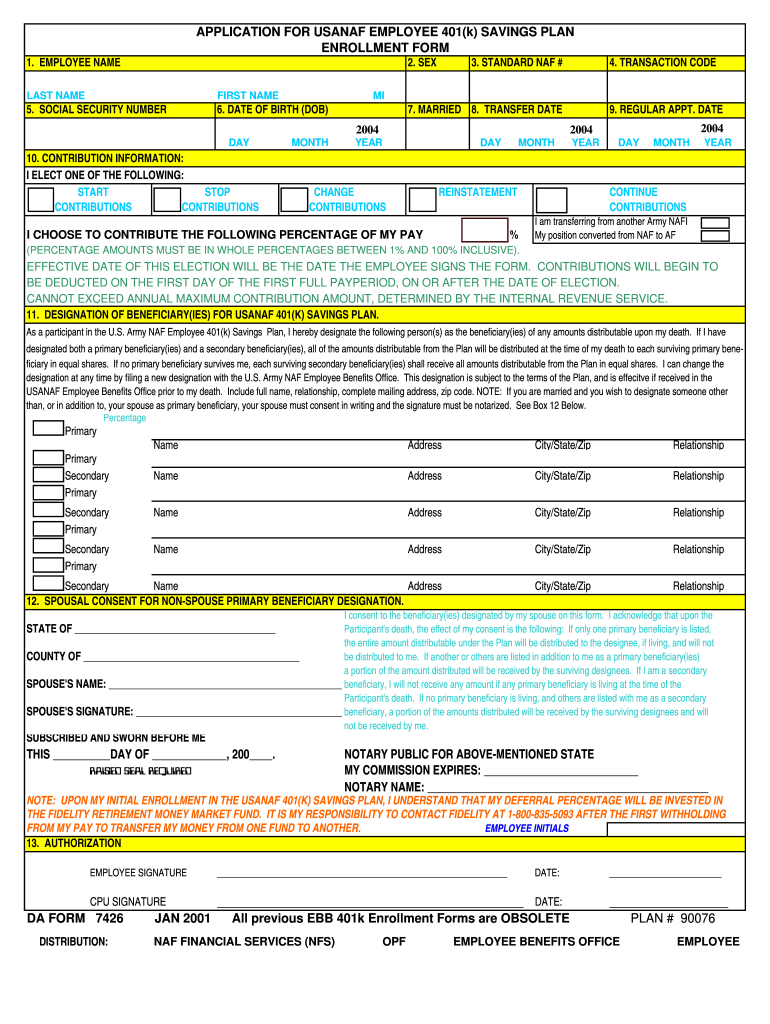
APPLICATION FOR USANAF EMPLOYEE 401(k) SAVINGS PLAN ENROLLMENT FORM 1. EMPLOYEE NAME LAST NAME FIRST NAME MI 2. SEX 3. STANDARD NAF # 4. TRANSACTION CODE 5. SOCIAL SECURITY NUMBER 6. DATE OF BIRTH.

Open form follow the instructions

Easily sign the form with your finger

Send filled & signed form or save
How to fill out the DA 7426 online
Filling out the DA 7426 form for the U.S. Army NAF Employee 401(k) Savings Plan can be straightforward. This guide provides step-by-step instructions to assist users in completing the form accurately and efficiently.
Follow the steps to complete the DA 7426 form online.
- Click ‘Get Form’ button to access the DA 7426 enrollment form and open it in your preferred editor.
- Enter your full name in the designated fields, including your last name, first name, and middle initial.
- Indicate your sex by selecting the appropriate option.
- Input your standard NAF number as assigned, or provide the installation code and work center.
- Choose the transaction code that applies to your situation from the list provided.
- Fill in your social security number in the specified field.
- Provide your date of birth in the format of day, month, and year.
- Complete the marriage status field if applicable.
- If transferring, document the transfer date accordingly.
- Select one option under contribution information and input the percentage you wish to contribute, ensuring it falls between 1% and 100%.
- Designate your primary and secondary beneficiaries by providing their names, relationships, and addresses.
- If applicable, complete the spousal consent section if you are designating a non-spouse as a primary beneficiary.
- Sign and date the authorization section to finalize your application.
- Save your changes, download, print, or share the completed form as needed.
Complete your DA 7426 enrollment form online today for a smoother enrollment process.
Experience a faster way to fill out and sign forms on the web. Access the most extensive library of templates available.
Related content
Stillwater, OK 74074. Bogus Check Restitution Division - 405-743-4763. Criminal...
For questions and inquiries. Call Us at 1-508-793-7426. Email Registrar's Office. DA...
sollevata da eventuali responsabilità dovute ... improprio da parte di personale non...
Get answers to your most pressing questions about US Legal Forms API.
What is a DA form 3749 Army weapons card?
What is a DA Form 3749? This form is used by the United States Department of the Army. It is known as an Equipment Receipt and will be used when equipment is issued to a unit in the U.S. Army. It will require various information that applies to the equipment as well as to the unit that is using the equipment.
What is the army weapon qualification form?
What form is the army weapon qualification card? A fillable DA 3595-R Form is used by the US Army as documentation of a soldier's ability to fire a weapon. this form is also known as a Record Fire Scorecard.
What is a DA Form 3749?
A fillable DA 3749 Form is a document used by the US Army. It is also known as an Equipment Receipt. It is completed when equipment is issued to an Army unit. The stock number and serial number for the equipment is listed on this form.
What is the qualification table 6 in the Army?
Table VI: This is the qualification table. In this table, Soldiers will execute the Army Record Course of Fire. This table uses live ammunition on an authorized live fire facility.
What is the new Army weapon qualification card?
What is the new Army weapons qualification card? The new qualification, the rifle and carbine qualification, was developed with the same principle as the Army Combat Fitness Test. It more holistically assesses a soldier's ability to employ situational awareness, safe weapon handling, and core marksmanship competencies.
What is DA Form 5692 R used for?
The DA Form 5692 R is a document used to provide information on Army vehicle inspections. This form is used to report any deficiencies or damage that has been found on a military vehicle during an inspection.
What is DA Form 7426?
You must fill out and sign a DA Form 3473 or DA Form 7426 (Portability Election) to join the Savings plan and an auto enrollment letter. These forms are available from your servicing Human Resources Office. Your contributions to the 401(k) Savings Plan are tax deferred.
What happens if you fail Army weapons qualification?
“Soldiers who fail to qualify on their individual weapon but have demonstrated the motivation to achieving the task standards are considered for reassignment to another basic combat training company or battalion.” Luckily, very few fail multiple attempts after retraining, which can result in separation.
Use professional pre-built templates to fill in and sign documents online faster. Get access to thousands of forms.
If you believe that this page should be taken down, please follow our DMCA take down process here.
This form is available in several versions. Select the version you need from the drop-down list below.