Loading
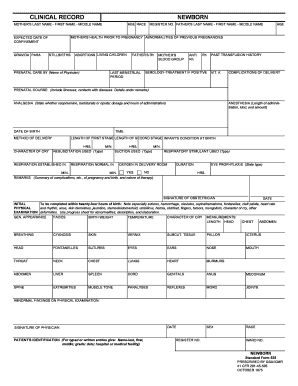
Get Clinical Record Newborn - Gsa
How it works
-

Open form follow the instructions
-

Easily sign the form with your finger
-

Send filled & signed form or save
How to fill out the Clinical Record Newborn - GSA online
The Clinical Record Newborn - GSA is an essential form used to document important details regarding a newborn's health and history. This guide will provide step-by-step instructions for filling out the form online, ensuring accurate and complete information is recorded.
Follow the steps to successfully complete the Clinical Record Newborn - GSA online.
- Press the ‘Get Form’ button to retrieve the Clinical Record Newborn - GSA and open it for editing.
- Start by entering the mother's last name, first name, and middle name, followed by her age. Record the mother's health prior to pregnancy, noting any abnormalities in previous pregnancies.
- Input the expected date of confinement, gravida, para, and registration number. Include the father's last name, first name, middle name, and any previous abortions, living children, or stillbirths.
- Document the prenatal care details, including the name of the physician providing care. Note the father's Rh factor, last menstrual period, and mother's blood group.
- Detail past transfusion history, including any Rh and anti-Rh serology results, and indicate if vitamin K was administered.
- Summarize any complications during delivery and the prenatal course, including any illnesses or contacts with diseases, and provide additional remarks if necessary.
- Indicate the type of analgesia used, including dosage and administration times. Document the time and date of birth, lengths of each stage of labor, and the infant's condition at birth.
- Specify the method of delivery and detail the character of the infant's cry. Record the anesthesia used, including length of administration, type, and amount.
- Outline resuscitation efforts, suction methods used, and any respiratory stimulants given. Note when respiration was established and confirm if it remained normal.
- Complete the remarks section with a summary of pregnancy and birth complications, as well as the type of eye prophylaxis administered.
- Sign and date the document for the obstetrician and ensure to complete the physical examination section within twenty-four hours post-birth, noting any significant observations.
- Fill in the measurements section, documenting vital statistics like birth weight, length, head, chest, and abdomen as well as respiratory observations.
- Record any abnormal findings observed during the physical examination alongside the physician's signature and patient's identification.
- Finally, indicate the condition on discharge, feeding details, follow-up orders, and any referrals. Sign and date any progress notes recorded.
- Once all sections are complete, save your changes, download the form, print it if necessary, or share it as required.
Complete your Clinical Record Newborn - GSA online to ensure proper health documentation.