Loading
Get Dswd Form Sample
How it works
-

Open form follow the instructions
-

Easily sign the form with your finger
-

Send filled & signed form or save
How to fill out the Dswd Form Sample online
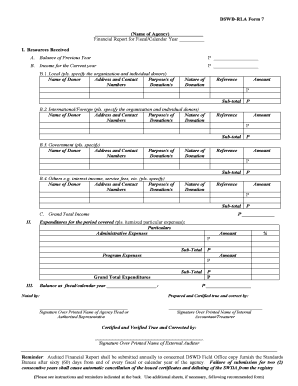
Filling out the Dswd Form Sample is essential for reporting financial resources received and expenditures of your agency. This guide will provide you with clear, step-by-step instructions to ensure that you accurately complete the form online.
Follow the steps to fill out the Dswd Form Sample effectively.
- Press the ‘Get Form’ button to access the Dswd Form Sample. This will allow you to open the document and begin filling it out.
- Indicate the name of your agency as registered with the relevant government bodies in the designated section at the top of the form.
- Specify the fiscal or calendar year for which the financial report is being made. This is crucial for clarity and accuracy in reporting.
- Under the 'Resources Received' section, fill in the 'Balance of Previous Year' and 'Income for the Current Year' amounts accurately.
- For each category of income (local, international, government, others), provide details about donors, including their names, addresses, contact information, and the purpose of each donation.
- Monetize and include any in-kind donations received by the agency as either administrative or program expenses as applicable.
- Complete the 'Expenditures for the Period Covered' section by itemizing each expense under the correct category: administrative or program expenses. Ensure the sub-totals and grand totals are calculated correctly.
- Calculate and provide the 'Balance as of fiscal/calendar year' by subtracting total expenditures from total resources received.
- Review the form thoroughly to verify that all necessary fields are completed and all information is accurate.
- Save your changes, and if needed, download, print, or share the completed form with relevant parties.
Complete your documents online with ease by following these steps!
Related links form
You may also call 313-267-8000 Monday through Friday, 8 a.m. - 5 p.m.