Loading
Get Va Form 21 0960c 1
How it works
-

Open form follow the instructions
-

Easily sign the form with your finger
-

Send filled & signed form or save
How to fill out the VA Form 21-0960C-1 online
Filling out the VA Form 21-0960C-1 can be a straightforward process when you have clear guidance. This form is essential for veterans applying for disability benefits due to Parkinson's disease, and understanding each section will help ensure accurate completion.
Follow the steps to successfully complete the VA Form 21-0960C-1 online.
- Click the ‘Get Form’ button to access the form and open it in the designated online platform.
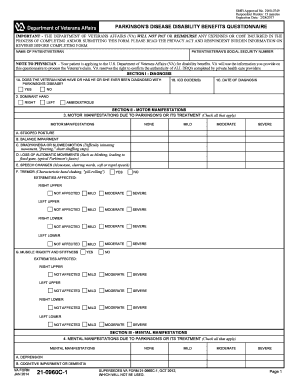
- Begin with Section I - Diagnosis. Enter the name of the patient or veteran and their social security number. Respond to whether the veteran has been diagnosed with Parkinson's disease by selecting 'Yes' or 'No'. If applicable, provide the ICD code(s) and the date of diagnosis. Indicate the dominant hand of the veteran.
- Proceed to Section II - Motor Manifestations. Check all applicable motor manifestations due to Parkinson's or its treatment, categorizing them as none, mild, moderate, or severe. Provide details on affected extremities as needed.
- In Section III - Mental Manifestations, check any mental manifestations applicable to the veteran, selecting none, mild, moderate, or severe.
- Move to Section IV - Additional Manifestations/Complications. Follow the same process as previous sections to check for any additional manifestations or complications the veteran may experience.
- Section V - Functional Impact and Remarks requires you to answer whether Parkinson's impacts the veteran's ability to work. If yes, provide an example. If there are any additional remarks, include them here.
- Finally, complete Section VI - Physician's Certification and Signature. The physician must sign and print their name, provide their medical license number, phone number, address, and date signed. Ensure all information is accurate and complete.
- Once all sections are completed, save your changes, and you can choose to download, print, or share the document as necessary.
Take the next step in securing your benefits by completing the VA Form 21-0960C-1 online today.
Fill out the Decision Review Request: Higher-Level Review (VA Form 20-0996). Bring your completed form to a VA regional office near you. You can also ask a regional benefit office for a copy of this form to fill out. Or you can call the VA toll-free hotline at 800-827-1000 to request a form.