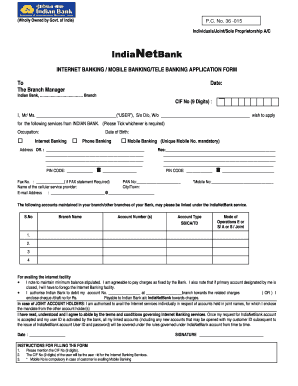
Ate: Indian Bank, Branch CIF No (9 Digits) : I, Mr/ Ms. ( USER ), S/o D/o, W/o wish to apply for the following services from INDIAN BANK. (Please Tick whichever is required) Occupation: Date of Birth: Internet Banking Phone Banking Mobile Banking (Unique Mobile No. mandatory) Address Off. :.

How it works
  • Open form

    Open form follow the instructions

  • Easily sign form

    Easily sign the form with your finger

  • Share form

    Send filled & signed form or save

How to fill out the Indianetbank online

Filling out the Indianetbank application form can streamline your access to various banking services. This guide provides a detailed overview of each section of the form, ensuring that you have a comprehensive understanding of how to complete it correctly.

Follow the steps to complete your application effectively.

  1. Click ‘Get Form’ button to obtain the form and open it for editing.
  2. Fill in the date on the form to indicate when you are submitting your application.
  3. Provide your CIF number (9 digits), which will also serve as your user ID for Internet Banking services.
  4. Enter your personal details in the section labeled 'I, Mr/Ms. _____,' filling in your full name and relation as applicable.
  5. Specify your occupation and date of birth accurately.
  6. Select the banking services you wish to apply for by ticking the appropriate boxes for Internet Banking, Phone Banking, or Mobile Banking.
  7. Provide both your official and residential address in the designated fields, ensuring all information is complete, including postal PIN codes.
  8. Include your PAN number and cellular service provider's name to facilitate identification.
  9. List the accounts you want to link under the Indianetbank service, detailing their respective branch names and account numbers.
  10. Acknowledge the bank's minimum balance requirements and confirm your agreement to pay any applicable charges.
  11. Sign the form to validate your application and date it appropriately.
  12. Once completed, you may save your changes, download a copy, print the form, or share it as necessary.

Complete your Indianetbank application online today to access seamless banking services.

Get form

Experience a faster way to fill out and sign forms on the web. Access the most extensive library of templates available.

Related content

POMS: GN 02402.344 - Coding Indian Bank Data for...

May 13, 2019 — We store Indian bank account data on the MBR in the same fields used for...

Learn more
Indian Bank PO Online Application Form-Link...

Nov 22, 2019 — Indian Bank is recruiting probationary officers to Post Graduate Diploma...

Learn more
CashTree - Wikipedia

CashTree is an interbank network found in 2003 by five public sector banks -- Syndicate...

Learn more
Questions & Answers

Get answers to your most pressing questions about US Legal Forms API.

Contact support

How can I transfer money through net banking in Indian Bank?

Log in to Indian Bank net banking or mobile banking. Choose “Fund Transfer” and “ Add payee” Enter all the details of the beneficiary including the MMID and mobile number, bank account number and IFSC code of the branch of the beneficiary account.

Charges for Net Banking facility : Free. DP account maintained with Indian Bank can be viewed.

Online Visit the NetBanking registration page. Enter your customer ID and confirm your mobile number to generate an OTP. Enter the OTP. Select your debit card and enter details. Set your IPIN. Login to NetBanking using your customer ID and new IPIN.

Customers have to use Indian Bank's internet banking portal, which can be accessed through: https://.netbanking.indianbank.in. Your login credentials will remain the same as that of erstwhile Allahabad Bank Internet Banking, and you are not required to re-register for internet banking.

0:18 3:28 How to use Net Banking with Indian Bank - YouTube YouTube Start of suggested clip End of suggested clip Button step 4 you will be directed to the next page where you can enter your password. There is aMoreButton step 4 you will be directed to the next page where you can enter your password. There is a provision. If you both click on the mode icon to activate it.

https://.netbanking.indianbank.in.

Q. How can I use Indian Bank net-banking? Go to Indian Bank's official net-banking website. Click on 'new registration' On the redirected page, enter all the details and click on 'I agree' to continue. You will receive an OTP on your registered mobile number.

(If you have forgotten your Transaction password, you can use the facility available in Options > User Profile > Forgot Transaction Password to reset transaction password by entering Mobile number and validating OTP and ATM card credentials.

Get This Form Now!

Use professional pre-built templates to fill in and sign documents online faster. Get access to thousands of forms.

If you believe that this page should be taken down, please follow our DMCA take down process here.

Get Indianetbank