Loading
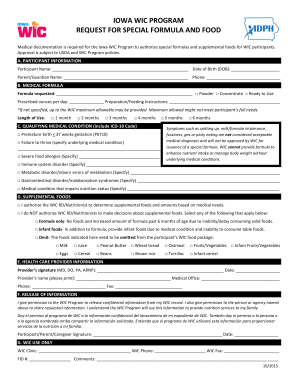
Get Printable Wic Forms Iowa
How it works
-

Open form follow the instructions
-

Easily sign the form with your finger
-

Send filled & signed form or save
How to fill out the printable Wic forms Iowa online
Completing the printable Wic forms Iowa requires attention to detail to ensure that all necessary information is provided. This guide will help users navigate each section of the form with clarity and confidence.
Follow the steps to successfully complete the form.
- Press the ‘Get Form’ button to obtain the form and open it in your preferred editing tool.
- In section A (Participant Information), start by entering the participant's full name and date of birth. Next, provide the name and contact number of the parent or guardian responsible for the participant.
- Move to section B (Medical Formula). Here, specify the formula requested by entering the type, selecting between powder, concentrate, or ready-to-use, and indicating the prescribed ounces per day. Include any preparation or feeding instructions needed.
- In section B, indicate the length of use by checking the appropriate box for the duration requested (1, 2, 3, 4, 5, or 6 months).
- Proceed to section C (Qualifying Medical Condition). Check all medical conditions applicable to the participant, and ensure to include the corresponding ICD-10 code if needed. Continue to specify any other underlying medical conditions as required.
- In section D (Supplemental Foods), indicate whether you authorize the WIC registered dietitian or nutritionist to determine supplemental foods based on medical needs. If not, select the appropriate options for the types of foods that need to be included or omitted.
- For section E (Health Care Provider Information), ensure that the provider completes this section. The provider must sign, print their name, list the medical office, and provide contact information.
- In section F (Release of Information), the participant or caregiver must read and agree to the terms, sign, and date the form to authorize the release of information.
- Once all sections are completed, review the form for any missing information or errors. After confirming accuracy, users can save changes, download, print, or share the form as needed.
Start filling out your Wic forms online to ensure a smooth application process.
How to Use Your WIC Card Your Iowa WIC card works like a debit card. Set up a PIN number at your local office, by calling Customer Service at 1-844-234-4948, or going to ebtEDGE.com. You can purchase WIC foods each month using your card. Your card works as your ID for WIC appointments.