Loading
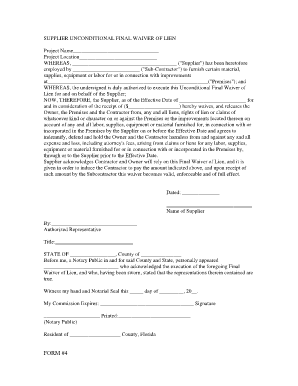
Get Final Material Waiver Form
How it works
-

Open form follow the instructions
-

Easily sign the form with your finger
-

Send filled & signed form or save
How to fill out the Final Material Waiver Form online
Filling out the Final Material Waiver Form online can help streamline the process of providing a waiver for materials supplied. This guide will walk you through each section of the form to ensure it is completed accurately and efficiently.
Follow the steps to successfully complete your waiver form.
- Click ‘Get Form’ button to obtain the form and open it in your preferred editor.
- Begin by filling in the Project Name and Project Location fields. Make sure to be precise to avoid any potential issues later.
- In the section labeled 'WHEREAS', identify and enter the name of the Supplier and the Sub-Contractor involved in the project.
- Next, provide details about the Premises where the work was performed. This is critical for legal verification.
- Enter the Effective Date of the waiver in the designated field to specify when the waiver becomes active.
- Fill in the amount received by the Supplier in the appropriate field to signify the consideration received for the waiver.
- Sign and print your name in the 'Name of Supplier' section. This confirms your authority to execute the form on behalf of the Supplier.
- Have an authorized representative sign the document in the 'By' section, and include their title for clarity.
- In the notary section, ensure a Notary Public witnesses the signing. They will complete their details and seal the document.
- After filling out all required fields, review the form for completeness and accuracy. You can then save changes, download, print, or share the completed waiver as needed.
Complete your Final Material Waiver Form online to ensure a smooth waiver process.
To remove a lien recorded on a paper title, you will need: the vehicle title. a release of lien letter and/or other notifications from the lienholder(s) currently named on the vehicle title. a completed Application for Texas Title and/or Registration (Form 130-U)