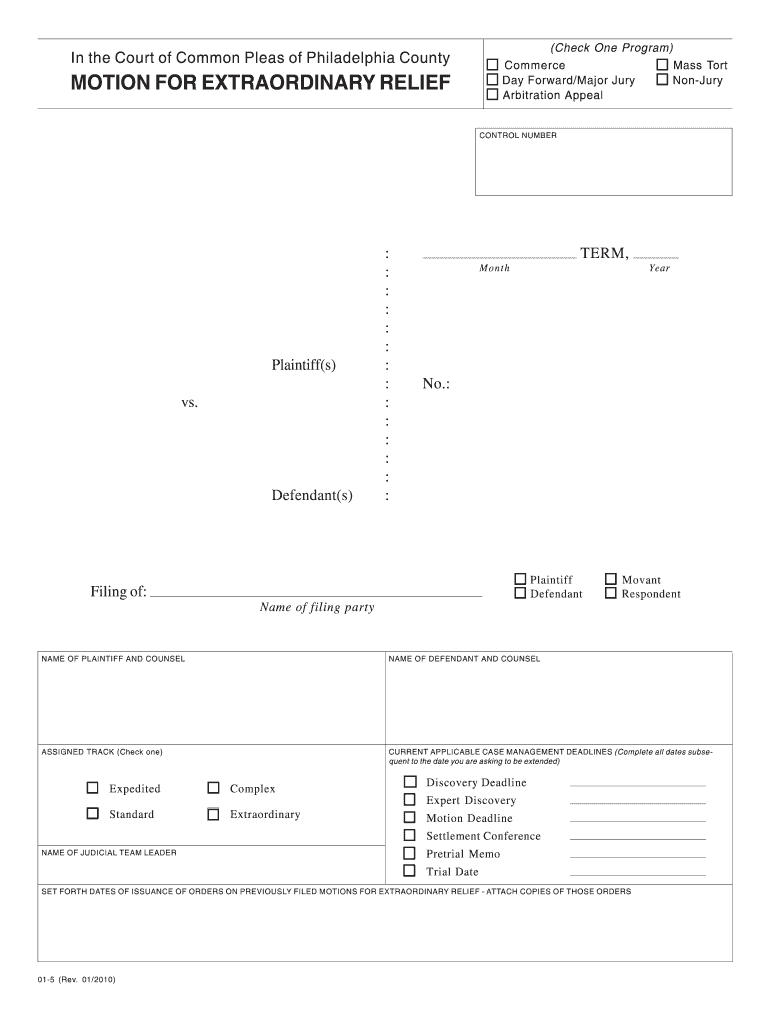
(Check One Program) In the Court of Common Pleas of Philadelphia County Commerce Day Forward/Major Jury Arbitration Appeal MOTION FOR EXTRAORDINARY RELIEF Mass Tort Non-Jury CONTROL NUMBER Plaintiff(s).
Loading

Open form follow the instructions

Easily sign the form with your finger

Send filled & signed form or save
How to fill out the Philadelphia Motion For Extraordinary Relief online
Filling out the Philadelphia Motion For Extraordinary Relief can be a straightforward process if you follow the right steps. This guide will help users like you navigate through each section of the form while ensuring clarity and precision.
Follow the steps to successfully complete the form.
- Click ‘Get Form’ button to access the Motion For Extraordinary Relief document and open it for editing.
- Begin by entering the control number, which helps identify your case. Make sure to fill in the correct details to avoid confusion later.
- In the plaintiff(s) vs. defendant(s) section, list the names of the individuals or entities involved in the case. Clearly distinguish between the plaintiff and defendant.
- Specify the filing term, month, year, and case number assigned to your motion to ensure it is accurately recorded.
- Enter the names and counsels for both the plaintiff and defendant in the designated fields. Double-check the spelling for accuracy.
- Select the assigned track, such as expedited, complex, standard, or extraordinary, based on the nature of your case.
- Provide current applicable case management deadlines. Fill in all dates following your requested extension period.
- List the name of the judicial team leader and include any pretrial memos and scheduled trial dates that are relevant to your case.
- Set forth the dates of issuance of orders related to previously filed motions for extraordinary relief. Attach copies of these orders for reference.
- In the section describing the relief requested, attach a proposed order outlining both current and proposed deadlines. Clearly state the reasons for your requested changes.
- Document your efforts to comply with deadlines, stating any schedules already set, along with the length of time and reasoning for further delays.
- Indicate the parties or counsel who received copies of this motion, alongside the corresponding dates of notification.
- Finally, certify your motion is correct by providing your name, title, date, and include your signature as the attorney for either the plaintiff or defendant.
- Once everything is filled out accurately, save the completed form. You may download it, print it, or share it as needed.
Complete your legal documents online with ease and confidence.
Experience a faster way to fill out and sign forms on the web. Access the most extensive library of templates available.
Related content
In the Court of Common Pleas of Philadelphia County. MOTION FOR EXTRAORDINARY RELIEF...
Oct 11, 2017 — 1709 Benjamin Franklin Parkway, 2nd Floor, Philadelphia, PA 19103...
The ear is the organ of hearing and, in mammals, balance. In mammals, the ear is usually...
Get answers to your most pressing questions about US Legal Forms API.
What is a motion for reconsideration Philadelphia court of Common Pleas?
A Petition for Reconsideration may be filed within 30 days of the date of a custody order if you believe that an error was made or that something very important was not considered. In filing a Petition for Reconsideration you are asking the same judge who heard the case to review his/her decision.
How long do you have to respond to a motion in Philadelphia court of Common Pleas?
Briefing Schedule. Generally, the non-moving party has 20 days to respond to a motion. After the motion is filed, the Motion Clerk will enter a "Response Date" on the Cover Sheet filed with the motion, officially setting the date by which all responses must be filed. Phila.
What is a motion to dismiss in Philadelphia?
What is a Motion to Dismiss? In a motion to dismiss, you ask the judge to end the case based on a specific substantive or procedural issue. The prosecutor also can ask for a dismissal if they agree to end the case permanently or want to temporarily end the case to refile with different charges or evidence later.
What is the Pennsylvania rule for motion to dismiss?
Rule 587 - Motion for Dismissal (a)Untimely Filing of Information. (1) Upon motion and a showing that an information has not been filed within a reasonable time, the court may order dismissal of the prosecution, or in lieu thereof, make such other order as shall be appropriate in the interests of justice.
What is a motion for extraordinary relief in PA?
(B) ORAL MOTION FOR EXTRAORDINARY RELIEF. (1) Under extraordinary circumstances, when the interests of justice require, the trial judge may, before sentencing, hear an oral motion in arrest of judgment, for a judgment of acquittal, or for a new trial.
How do I withdraw a motion from Philadelphia court of Common Pleas?
For all Discovery motions that are withdrawn, the moving party shall file a Praecipe to Withdraw, identifying the e-file number, and identifying the party or parties against whom the motion is pending, with the relief sought. See the attached form for the appropriate format to be used for this Praecipe to Withdraw.
Use professional pre-built templates to fill in and sign documents online faster. Get access to thousands of forms.
If you believe that this page should be taken down, please follow our DMCA take down process here.