Loading
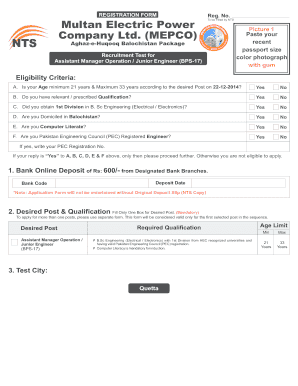
Get Registration Form Multan Electric Power Picture 1 Company - Nts Org
How it works
-

Open form follow the instructions
-

Easily sign the form with your finger
-

Send filled & signed form or save
How to fill out the REGISTRATION FORM Multan Electric Power Company - Nts Org online
This guide provides step-by-step instructions on how to successfully fill out the REGISTRATION FORM for the Multan Electric Power Company. It is designed to assist users in completing the form accurately and submitting it online for the recruitment test.
Follow the steps to fill out the registration form correctly.
- Click the ‘Get Form’ button to obtain the registration form and open it in your preferred online editor.
- Carefully read the eligibility criteria listed in the form. Confirm if you meet the age, qualification, domicile, computer literacy, and PEC registration requirements by selecting 'Yes' or 'No' for each criterion.
- Complete the bank deposit information. Ensure you provide the original deposit slip from designated bank branches for the application fee of Rs: 600/-. Include the bank code and deposit date.
- Select your desired post from the options provided. Remember to fill in only one box for your desired position and note that this form will be valid only for the first selected post.
- Fill in your personal information using capital letters, ensuring to leave spaces between words. Provide details such as your full name, father's name, CNIC number, date of birth, email, and postal address.
- Indicate whether you are a government servant and provide your religion. If you are a government servant, remember to submit the No Objection Certificate (NOC) from your department.
- List your academic information carefully. Ensure to include the exact names of your degrees, major subjects, passing years, and your marks. Attach attested copies of your academic certificates as instructed.
- If you have employment experience, complete the employment record section by providing details of organizations you've worked with, your job titles, and the duration of your employment. Attach any relevant experience documents.
- Sign the undertaking section at the end of the form, affirming that all information provided is accurate. Affix your recent passport size photograph as specified.
- Review the entire form for accuracy before saving changes, downloading, or printing for submission. Ensure all required documents are attached and prepare to submit your application by mail to the NTS office.
Complete your registration form online today and secure your chance to apply for the desired position!
Related links form
College Document # COAS 034 UCC Document # Date Received CATALOG YEAR 20102011 (Please Use Separate
College Document # COAS 042 UCC Document # Date Received CATALOG YEAR 20102011 (Please Use Separate
College Document # COAS 181 257 Date Received UCC Document # CATALOG YEAR 20112012 (Please Use
College Document COAS 172 232 UCC Document # Document Type CATALOG YEAR 20112012 (Please Use
ing to our privacy experts, Signal is probably the most secure messaging app. Its open-source encryption protocol has become the industry standard for end-to-end message and voice encryption. And Signal is funded by donations and grants, so it isn't incentivized to monetize data.
Industry-leading security and compliance
US Legal Forms protects your data by complying with industry-specific security standards.
-
In businnes since 199725+ years providing professional legal documents.
-
Accredited businessGuarantees that a business meets BBB accreditation standards in the US and Canada.
-
Secured by BraintreeValidated Level 1 PCI DSS compliant payment gateway that accepts most major credit and debit card brands from across the globe.