Loading
Form preview
  • US Legal Forms
  • Form Library
  • More Forms
  • More Multi-State Forms
  • Hr Form 1108 - Patient-wise

Get Hr Form 1108 - Patient-wise

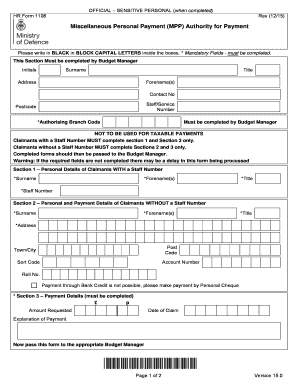
Apr 6, 2017 ... HR Form 1108. Rev (12/15). Miscellaneous Personal Payment (MPP) Authority for Payment. Please write in BLACK in BLOCK CAPITAL .

How it works

  1. Open form

    Open form follow the instructions

  2. Easily sign form

    Easily sign the form with your finger

  3. Share form

    Send filled & signed form or save

How to fill out the HR Form 1108 - Patient-Wise online

This guide will assist you in completing the HR Form 1108 - Patient-Wise online, ensuring you understand each section and the necessary fields. Follow the instructions closely to facilitate a smooth filing process.

Follow the steps to fill out the HR Form 1108 - Patient-Wise online.

  1. Click the ‘Get Form’ button to access the form and open it in your online editor.
  2. Complete the required details in the section labeled for the Budget Manager. This includes initials, surname, title, address, forename(s), contact number, staff/service number, postcode, and authorising branch code.
  3. If you are a claimant with a staff number, fill out Section 1 which requires your surname, forename(s), title, and staff number. Ensure all mandatory fields marked with an asterisk are filled.
  4. If you are a claimant without a staff number, complete Section 2. This section requires your surname, forename(s), title, address, postcode, town/city, sort code, account number, and roll number. Note that payment through bank credit is not possible and a personal cheque must be requested.
  5. Move to Section 3, which must be filled out regardless of your staff status. Here, you will enter the amount requested, date of claim, and an explanation of the payment.
  6. Pass the completed form along to the appropriate Budget Manager for processing.
  7. The Budget Manager will fill out Section 4, classifying the details, including VAT, amount, RAC, LPC, UIN, and branch reference. Ensure they do not send receipts, as they must be retained locally for audit purposes.
  8. In Section 5, the Authorising Officer will declare that all information is accurate. This section requires their surname, forename(s), grade, telephone number, signature, title, and date.
  9. Finally, submit pages 1 and 2 of the completed form by post to Defence Business Services, Scanning Hub, PO Box 38, Cheadle Hulme, SK8 7NU. Remember, do not staple or attach further information, and faxed copies will not be accepted.

Encourage others to complete their forms online for efficiency and accuracy.

Get form

Experience a faster way to fill out and sign forms on the web. Access the most extensive library of templates available.
Get form

Related content

HR 1108 - GovInfo
H. R. 1108. AN ACT ... •HR 1108 EH ... form of nicotine in each tobacco product...
Learn more
HR 3590 - US Government Publishing Office
Dec 24, 2009 — Providing Federal coverage and payment coordination for dual eligible...
Learn more
ProSeI-16 - Apple2Online.com
Dec 22, 1990 — The START file is not supplied in zipped form in order to support the Mix...
Learn more

Related links form

Instructions For Completing Form 700-U - California State University ... - Calstate Sold Put Option AA-2006-12 - The California State University Springimm With Tb.doc - Calvin

Questions & Answers

Get answers to your most pressing questions about US Legal Forms API.

Contact support

Look for a lock icon near your browser's location field. Remember to look for “https” and the lock icon. If you don't see those two indicators, your communication to the website is not secure.

How to change the name of your default home network Use a strong password for your router. ... Strengthen your Wi-Fri encryption. ... Use a VPN for additional network security. ... Keep your router firmware up to date. ... Use a firewall to protect the devices on your network. ... Consider changing your router's IP address.

Digital certificates identify computers, phones, apps, and other devices for security. Just like you'd use your driver's license to show that you can legally drive, a digital certificate identifies your device and confirms that it should be able to access something. Important: You're using an older Android version.

Utilize a VPN If you're unsure about the security status of the network you're connected to, using a VPN (Virtual Private Network) client is mandatory. A VPN will enable you to connect to a network securely. At the same time, the VPN will shield your browsing activity on public wifi from prying eyes.

It means that your browser can't verify the SSL certificate of the website you're trying to visit. In other words, your browser shows you this message when it isn't sure if the website will securely encrypt your data.

5 rules for keeping cell phones safe at school Pick a safe place for devices. ... Put a password on devices. ... Keep a charger in backpacks. ... Consider location sharing. ... Leave some tech at home.

Created with Sketch. About securing your device. Secure your screen with a strong password. Turn on your device's auto-lock feature. a trusted security app. Be cautious when installing apps. operating system (OS) updates when available. Avoid using unsecured, public Wi-Fi networks.

On-device encryption is another default Android security feature. Important to note: You must set your phone to lock with a pattern, PIN, or password for the encryption to kick in. When your phone is locked, 256-bit AES standard encryption will protect the data stored on that device.

Get This Form Now!

Use professional pre-built templates to fill in and sign documents online faster. Get access to thousands of forms.
Get form
If you believe that this page should be taken down, please follow our DMCA take down processhere.
Get HR Form 1108 - Patient-Wise
Get form
  • Adoption
  • Bankruptcy
  • Contractors
  • Divorce
  • Home Sales
  • Employment
  • Identity Theft
  • Incorporation
  • Landlord Tenant
  • Living Trust
  • Name Change
  • Personal Planning
  • Small Business
  • Wills & Estates
  • Packages A-Z
  • Affidavits
  • Bankruptcy
  • Bill of Sale
  • Corporate - LLC
  • Divorce
  • Employment
  • Identity Theft
  • Internet Technology
  • Landlord Tenant
  • Living Wills
  • Name Change
  • Power of Attorney
  • Real Estate
  • Small Estates
  • Wills
  • All Forms
  • Forms A-Z
  • Form Library
  • Legal Hub
  • About Us
  • Help Portal
  • Legal Resources
  • Blog
  • Affiliates
  • Contact Us
  • Delete My Account
  • Site Map
  • Industries
  • Forms in Spanish
  • Localized Forms
  • State-specific Forms
  • Forms Kit
  • Real Estate Handbook
  • All Guides
  • Notarize
  • Incorporation services
  • For Consumers
  • For Small Business
  • For Attorneys
  • USLegal
  • FormsPass
  • pdfFiller
  • signNow
  • altaFlow
  • DocHub
  • Instapage
Form Packages
  • Adoption
  • Bankruptcy
  • Contractors
  • Divorce
  • Home Sales
  • Employment
  • Identity Theft
  • Incorporation
  • Landlord Tenant
  • Living Trust
  • Name Change
  • Personal Planning
  • Small Business
  • Wills & Estates
  • Packages A-Z
Form Categories
  • Affidavits
  • Bankruptcy
  • Bill of Sale
  • Corporate - LLC
  • Divorce
  • Employment
  • Identity Theft
  • Internet Technology
  • Landlord Tenant
  • Living Wills
  • Name Change
  • Power of Attorney
  • Real Estate
  • Small Estates
  • Wills
  • All Forms
  • Forms A-Z
  • Form Library
Customer Service
  • Legal Hub
  • About Us
  • Help Portal
  • Legal Resources
  • Blog
  • Affiliates
  • Contact Us
  • Delete My Account
  • Site Map
  • Industries
  • Forms in Spanish
  • Localized Forms
  • State-specific Forms
  • Forms Kit
Legal Guides
  • Real Estate Handbook
  • All Guides
Prepared for you
  • Notarize
  • Incorporation services
Our Customers
  • For Consumers
  • For Small Business
  • For Attorneys
Our Sites
  • USLegal
  • FormsPass
  • pdfFiller
  • signNow
  • altaFlow
  • DocHub
  • Instapage
Social Media
Call us now toll free:
+1 833 426 79 33
As seen in:
© Copyright 1999-2026 airSlate Legal Forms, Inc. 3720 Flowood Dr, Flowood, Mississippi 39232
  • Your Privacy Choices
  • Terms of Service
  • Privacy Notice
  • Content Takedown Policy
  • Bug Bounty Program