Loading
Form preview
  • US Legal Forms
  • Other Templates
  • More Forms
  • More Multi-State Forms
  • Health Promotion Officer Past Question Papers

Get Health Promotion Officer Past Question Papers

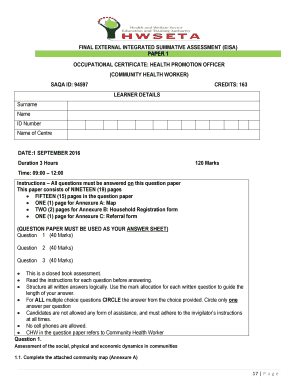
FINAL EXTERNAL INTEGRATED SUMMATIVE ASSESSMENT (EISA) PAPER 1 OCCUPATIONAL CERTIFICATE: HEALTH PROMOTION OFFICER (COMMUNITY HEALTH WORKER) SAQA ID: 94597 CREDITS: 163 LEARNER DETAILS Surname Name.

How it works

  1. Open form

    Open form follow the instructions

  2. Easily sign form

    Easily sign the form with your finger

  3. Share form

    Send filled & signed form or save

How to fill out the Health Promotion Officer Past Question Papers online

This guide provides comprehensive steps on how to accurately fill out the Health Promotion Officer Past Question Papers online. Whether you are a novice or have prior experience, this guide will support your completion of the form effectively.

Follow the steps to successfully complete the Health Promotion Officer Past Question Papers.

  1. Press the 'Get Form' button to access the Health Promotion Officer Past Question Papers. This will allow you to open the document in your preferred online format.
  2. Begin by filling in your learner details in the designated sections, including your surname, first name, ID number, and the name of your center. Ensure all fields are accurately completed as this information is critical.
  3. Proceed to read the instructions carefully for each question before answering. This will help you understand the requirements and structure your answers logically.
  4. For multiple choice questions, make sure to circle only one answer per question. Circle your choice clearly to avoid misinterpretation during evaluation.
  5. Utilize the annexures provided to complete the necessary forms and maps accurately. Pay attention to detail when following scenarios for accurate response formulation.
  6. Complete all sections of the form as specified. If there are any written responses, structure them according to the marks allocated to guide the length and detail of your answers.
  7. After ensuring all questions are answered comprehensively, review your entries. Once satisfied, save your changes, download or print the completed form for your records.

Take the next step towards your certification by filling out the Health Promotion Officer Past Question Papers online today.

Get form

Experience a faster way to fill out and sign forms on the web. Access the most extensive library of templates available.
Get form

Related content

Institutional analysis of health promotion for...
Sep 5, 2016 — This paper is based on two intertwining research goals: (1) exploring...
Learn more
Health Promotion Questions And Answers Mcq...
Dec 5, 2020 — Health promotion officer interview questions & answers.. In this post, you...
Learn more
Test (assessment) - Wikipedia
A test or examination (informally, exam or evaluation) is an educational assessment...
Learn more

Related links form

SAMPLE APPLICATION - Usm Permanent Address Form - The University Of Tennessee Health ... - Uthsc The University Of South Dakota School Of Education Application For ... - Usd 2011-2012 Program Assessment Report

Questions & Answers

Get answers to your most pressing questions about US Legal Forms API.

Contact support

Lock cells with formulas. Now, go to lock the selected cells with formulas. To do this, press Ctrl + 1 to open the Format Cells dialog again, switch to the Protection tab, and check the Locked checkbox. The Locked option prevents the user from overwriting, deleting or changing the contents of the cells.

Locking formulas and preventing accidental changes Select the cells that contain the formulas you want to lock. Right-click on the selected cells and choose "Format Cells" from the menu. In the Format Cells dialog box, select the "Protection" tab. Check the box next to "Hidden" and "Locked" to lock and hide the formulas.

0:30 2:00 Excel Lock Cells and Protect Formula (but allow data entry) - YouTube YouTube Start of suggested clip End of suggested clip Then we click on ok and go to the file tab. And here in the info. Section we click on protectMoreThen we click on ok and go to the file tab. And here in the info. Section we click on protect workbook. And then on protect current sheet. Now we can enter a password.

Use the F4 key The F4 key is the easiest way to lock cell references. Simply select the cell or range of cells that you want to lock, then press the F4 key. Excel will automatically add the $ sign to the appropriate places in the cell reference. One advantage of using the F4 key is that it's quick and easy.

0:30 2:00 Excel Lock Cells and Protect Formula (but allow data entry) - YouTube YouTube Start of suggested clip End of suggested clip Then we click on ok and go to the file tab. And here in the info. Section we click on protectMoreThen we click on ok and go to the file tab. And here in the info. Section we click on protect workbook. And then on protect current sheet. Now we can enter a password.

If you want to maintain the original cell reference when you copy it, you "lock" it by putting a dollar sign ($) before the cell and column references. For example, when you copy the formula =$A$2+$B$2 from C2 to D2, the formula stays exactly the same. This is an absolute reference.

Lock cells with formulas. To do this, press Ctrl + 1 to open the Format Cells dialog again, switch to the Protection tab, and check the Locked checkbox. The Locked option prevents the user from overwriting, deleting or changing the contents of the cells.

Lock the spreadsheet by using the "Ctrl+1" command to open the "Format Cells" dialog box, then go to the "Protection" tab and check "Locked." As with unlocking the spreadsheet, activating the "Lock" function only takes effect after protecting the worksheet.

Get This Form Now!

Use professional pre-built templates to fill in and sign documents online faster. Get access to thousands of forms.
Get form
If you believe that this page should be taken down, please follow our DMCA take down processhere.
Get Health Promotion Officer Past Question Papers
Get form
  • Adoption
  • Bankruptcy
  • Contractors
  • Divorce
  • Home Sales
  • Employment
  • Identity Theft
  • Incorporation
  • Landlord Tenant
  • Living Trust
  • Name Change
  • Personal Planning
  • Small Business
  • Wills & Estates
  • Packages A-Z
  • Affidavits
  • Bankruptcy
  • Bill of Sale
  • Corporate - LLC
  • Divorce
  • Employment
  • Identity Theft
  • Internet Technology
  • Landlord Tenant
  • Living Wills
  • Name Change
  • Power of Attorney
  • Real Estate
  • Small Estates
  • Wills
  • All Forms
  • Forms A-Z
  • Other Templates
  • Legal Hub
  • About Us
  • Help Portal
  • Legal Resources
  • Blog
  • Affiliates
  • Contact Us
  • Delete My Account
  • Site Map
  • Industries
  • Forms in Spanish
  • Localized Forms
  • State-specific Forms
  • Forms Kit
  • Real Estate Handbook
  • All Guides
  • Notarize
  • Incorporation services
  • For Consumers
  • For Small Business
  • For Attorneys
  • USLegal
  • FormsPass
  • pdfFiller
  • signNow
  • altaFlow
  • DocHub
  • Instapage
Form Packages
  • Adoption
  • Bankruptcy
  • Contractors
  • Divorce
  • Home Sales
  • Employment
  • Identity Theft
  • Incorporation
  • Landlord Tenant
  • Living Trust
  • Name Change
  • Personal Planning
  • Small Business
  • Wills & Estates
  • Packages A-Z
Form Categories
  • Affidavits
  • Bankruptcy
  • Bill of Sale
  • Corporate - LLC
  • Divorce
  • Employment
  • Identity Theft
  • Internet Technology
  • Landlord Tenant
  • Living Wills
  • Name Change
  • Power of Attorney
  • Real Estate
  • Small Estates
  • Wills
  • All Forms
  • Forms A-Z
  • Other Templates
Customer Service
  • Legal Hub
  • About Us
  • Help Portal
  • Legal Resources
  • Blog
  • Affiliates
  • Contact Us
  • Delete My Account
  • Site Map
  • Industries
  • Forms in Spanish
  • Localized Forms
  • State-specific Forms
  • Forms Kit
Legal Guides
  • Real Estate Handbook
  • All Guides
Prepared for you
  • Notarize
  • Incorporation services
Our Customers
  • For Consumers
  • For Small Business
  • For Attorneys
Our Sites
  • USLegal
  • FormsPass
  • pdfFiller
  • signNow
  • altaFlow
  • DocHub
  • Instapage
Social Media
Call us now toll free:
+1 833 426 79 33
As seen in:
© Copyright 1999-2026 airSlate Legal Forms, Inc. 17 Station Street, Ste. 203, Brookline, MA 02445
  • Your Privacy Choices
  • Terms of Service
  • Privacy Notice
  • Content Takedown Policy
  • Bug Bounty Program