Loading
Form preview
  • US Legal Forms
  • Other Templates
  • More Forms
  • More Multi-State Forms
  • Wv Salvage Yard License

Get Wv Salvage Yard License

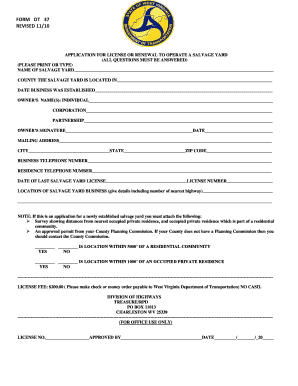
FORM DT 37 REVISED 11/10 APPLICATION FOR LICENSE OR RENEWAL TO OPERATE A SALVAGE YARD ALL QUESTIONS MUST BE ANSWERED PLEASE PRINT OR TYPE NAME OF SALVAGE YARD COUNTY THE SALVAGE YARD IS LOCATED IN DATE BUSINESS WAS ESTABLISHED OWNER S NAME S INDIVIDUAL CORPORATION PARTNERSHIP OWNER S SIGNATUREDATE MAILING ADDRESS CITYSTATEZIP CODE BUSINESS TELEPHONE NUMBER RESIDENCE TELEPHONE NUMBER DATE OF LAST SALVAGE YARD LICENSELICENSE NUMBER LOCATION OF SALV.

How it works

  1. Open form

    Open form follow the instructions

  2. Easily sign form

    Easily sign the form with your finger

  3. Share form

    Send filled & signed form or save

How to fill out the Wv Salvage Yard License online

Filling out the Wv Salvage Yard License is essential for those looking to operate a salvage yard in West Virginia. This guide provides a clear, step-by-step process to complete the application online, ensuring that all necessary components are addressed accurately.

Follow the steps to complete your application successfully.

  1. Press the ‘Get Form’ button to access the application form and open it in the editor.
  2. Provide the name of your salvage yard in the designated field.
  3. Indicate the county where your salvage yard is located by selecting from the provided options.
  4. Enter the date your business was established in the specified field.
  5. Fill in the name(s) of the owner(s) of the salvage yard. This includes options for individual, corporation, or partnership.
  6. Ensure that the owner’s signature is included along with the date of signing.
  7. Provide your complete mailing address, including city, state, and ZIP code.
  8. Enter the business telephone number in the appropriate section.
  9. Include the residence telephone number as required.
  10. Fill in the date of your last salvage yard license if applicable, along with the corresponding license number.
  11. Describe the location of your salvage yard business, ensuring to include details such as the number of the nearest highway.
  12. If this is a new salvage yard application, ensure you attach the necessary documentation: a survey indicating distances from the nearest occupied private residence and an approved permit from your County Planning Commission.
  13. Answer the questions regarding the location's proximity to residential communities and occupied residences, selecting 'yes' or 'no' as appropriate.
  14. Review the application for completeness, ensuring all fields are filled out correctly.
  15. Finalize the application by saving your changes, downloading, printing, or sharing the form as needed.

Complete your Wv Salvage Yard License application online today!

Get form

Experience a faster way to fill out and sign forms on the web. Access the most extensive library of templates available.
Get form

Related content

article 23. salvage yards. - West Virginia Code
(a) "Abandoned salvage yard" means any unlicensed salvage yard or any salvage yard that...
Learn more
Sector M: Automobile Salvage Yards - Maryland.gov
As a result, NPDES permitting authorities, which may be either EPA or a state...
Learn more
List of books in The Railway Series - Wikipedia
This article is a list of books in The Railway Series, a series of children's books...
Learn more

Related links form

AU NSW 1091 2022 NASTC Insurance Services Insurance Application 2020 Canada Camp Ojibway: CIT Feedback Form 2012 AU HSBC HBAA828VDC 2020

Questions & Answers

Get answers to your most pressing questions about US Legal Forms API.

Contact support

It's also important for both parties to sign off on an SOW before any work begins as this makes it legally binding on both sides. Failure to do so could mean that one party has no legal recourse should things go wrong further down the line.

A statement of work or SoW is a contract setting up the expectations for the project and aligning the team(s) involved. Details should clarify the price, timeline, deliverables, process, expectations of requirements, invoicing schedules, and much more, depending on the scope and breadth of your project.

Purpose of the project. Scope of work being performed. Location of the project, project length, and any work requirements. Expected deadlines and deliverables.

The following tips can be used as a reference when creating an SOW. Avoid verbs that can lead to vague statements. The phrase "the contractor shall perform" definitively states which party is to do the work. Avoid "should" or "may" because they leave the decision for action up to the contractor.

Elements of an SOW can include: Purpose of the project. Scope of work being performed. Location of the project, project length, and any work requirements. Expected deadlines and deliverables. Acceptance criteria. Any hardware and software required. Performance-based standards to be met.

A statement of work is legally binding, but it is not the final, formal contract signed at the end of the contracting process. It can be thought of as the formal foundation of a final contract.

Both parties need to agree to and sign a statement of work (SOW). But what exactly is this document, and how does it fit into the broader landscape of business agreements? Read on to learn more about SOWs, what they are used for, and how to create your own.

How to Write a Good Statement of Work Introduce the project. You always begin the statement of work with an introduction. ... Define the vision. ... Set the project requirements. ... Define the scope. ... Set the deadline of the project. ... Allocate key resources. ... Create the schedule. ... Specify the terms of payment and due dates.

These are the steps you can take to create a simple, but well-defined statement of work. Introduce the project. ... Define the vision. ... Set the project requirements. ... Define the scope. ... Set the deadline of the project. ... Allocate key resources. ... Create the schedule. ... Specify the terms of payment and due dates.

A Statement of Work, often known as an SOW, is a business agreement that outlines deliverables and project goals. It's created to keep everyone on the same page about deadlines, scope of work, and project expectations.

Get This Form Now!

Use professional pre-built templates to fill in and sign documents online faster. Get access to thousands of forms.
Get form
If you believe that this page should be taken down, please follow our DMCA take down processhere.
Get Wv Salvage Yard License
Get form
  • Adoption
  • Bankruptcy
  • Contractors
  • Divorce
  • Home Sales
  • Employment
  • Identity Theft
  • Incorporation
  • Landlord Tenant
  • Living Trust
  • Name Change
  • Personal Planning
  • Small Business
  • Wills & Estates
  • Packages A-Z
  • Affidavits
  • Bankruptcy
  • Bill of Sale
  • Corporate - LLC
  • Divorce
  • Employment
  • Identity Theft
  • Internet Technology
  • Landlord Tenant
  • Living Wills
  • Name Change
  • Power of Attorney
  • Real Estate
  • Small Estates
  • Wills
  • All Forms
  • Forms A-Z
  • Other Templates
  • Legal Hub
  • About Us
  • Help Portal
  • Legal Resources
  • Blog
  • Affiliates
  • Contact Us
  • Delete My Account
  • Site Map
  • Industries
  • Forms in Spanish
  • Localized Forms
  • State-specific Forms
  • Forms Kit
  • Real Estate Handbook
  • All Guides
  • Notarize
  • Incorporation services
  • For Consumers
  • For Small Business
  • For Attorneys
  • USLegal
  • FormsPass
  • pdfFiller
  • signNow
  • altaFlow
  • DocHub
  • Instapage
Form Packages
  • Adoption
  • Bankruptcy
  • Contractors
  • Divorce
  • Home Sales
  • Employment
  • Identity Theft
  • Incorporation
  • Landlord Tenant
  • Living Trust
  • Name Change
  • Personal Planning
  • Small Business
  • Wills & Estates
  • Packages A-Z
Form Categories
  • Affidavits
  • Bankruptcy
  • Bill of Sale
  • Corporate - LLC
  • Divorce
  • Employment
  • Identity Theft
  • Internet Technology
  • Landlord Tenant
  • Living Wills
  • Name Change
  • Power of Attorney
  • Real Estate
  • Small Estates
  • Wills
  • All Forms
  • Forms A-Z
  • Other Templates
Customer Service
  • Legal Hub
  • About Us
  • Help Portal
  • Legal Resources
  • Blog
  • Affiliates
  • Contact Us
  • Delete My Account
  • Site Map
  • Industries
  • Forms in Spanish
  • Localized Forms
  • State-specific Forms
  • Forms Kit
Legal Guides
  • Real Estate Handbook
  • All Guides
Prepared for you
  • Notarize
  • Incorporation services
Our Customers
  • For Consumers
  • For Small Business
  • For Attorneys
Our Sites
  • USLegal
  • FormsPass
  • pdfFiller
  • signNow
  • altaFlow
  • DocHub
  • Instapage
Social Media
Call us now toll free:
+1 833 426 79 33
As seen in:
© Copyright 1999-2026 airSlate Legal Forms, Inc. 17 Station Street, Suite 303, Brookline, MA 02445
  • Your Privacy Choices
  • Terms of Service
  • Privacy Notice
  • Content Takedown Policy
  • Bug Bounty Program