Loading
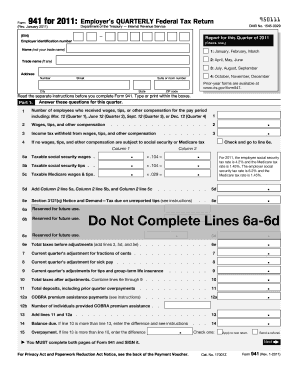
Get Irs 941 2011
How it works
-

Open form follow the instructions
-

Easily sign the form with your finger
-

Send filled & signed form or save
How to fill out the IRS 941 online
Filing the IRS 941 form online can seem overwhelming, but with a step-by-step approach, it becomes manageable. This guide provides clear instructions to help users accurately complete their Employer’s Quarterly Federal Tax Return.
Follow the steps to fill out the IRS 941 online effectively.
- Click ‘Get Form’ button to obtain the form and open it in the editor.
- Enter your Employer Identification Number (EIN) at the top of the form.
- Select the quarter for which you are reporting: 1 for January through March, 2 for April through June, 3 for July through September, or 4 for October through December.
- Provide your legal name as it appears on your business documents. If applicable, also include your trade name.
- Fill in your business address, including street number, suite or room number (if applicable), city, state, and ZIP code.
- In Part 1, answer the questions regarding the number of employees and their applicable wages, tips, or other compensation.
- Report the income tax withheld from employees' wages in the designated field.
- Complete the sections for taxable social security and Medicare wages and tips, adding them as necessary.
- Calculate and enter the total taxes before adjustments.
- Make any required adjustments using lines provided for fractions of cents or sick pay.
- Total up your taxes after adjustments, ensuring to include any payments or overpayments.
- Proceed to Part 2, describing your deposit schedule and tax liabilities for the quarter.
- Provide necessary details regarding any changes in your business operations or deposits.
- In the final section, sign and date the form, confirming its accuracy.
- Upon completion, you can save changes, download, print, or share the form as needed.
Complete your IRS 941 form online today to ensure accurate and timely tax reporting.
Get form
Experience a faster way to fill out and sign forms on the web. Access the most extensive library of templates available.
Related links form
You can send documents to the IRS through mailing or electronic submission methods. For sent papers, ensure you use certified mail for tracking purposes. If you opt for electronic submission, consider using tax software that supports document uploads. Remember to keep copies of any documents you send for your records.
Get This Form Now!
Use professional pre-built templates to fill in and sign documents online faster. Get access to thousands of forms.